n8n Data Transformation with the Code Node
A production guide to using the n8n Code node for clean data transformation, item-safe JavaScript, schema checks, error handling, and maintainable workflow logic.
The 60-second answer
- The n8n Code node is best used as a small transformation boundary, not as a hidden application inside a workflow. It should reshape data, validate assumptions, and return predictable items.
- When the transformed data is headed into an external API, pair it with the n8n HTTP Request node guide so the request layer handles authentication, pagination, and errors cleanly.
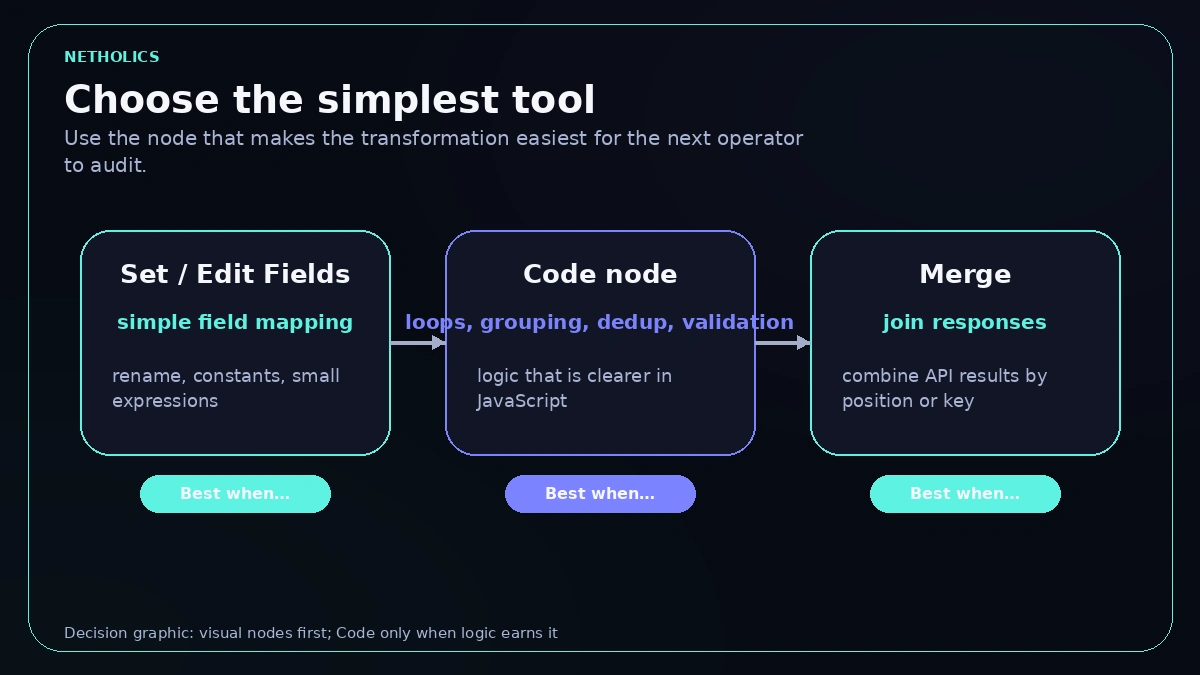
- Use visual nodes for simple field mapping. Use Code when the logic needs loops, grouping, deduplication, normalization, or branching that would become fragile as a chain of tiny nodes.
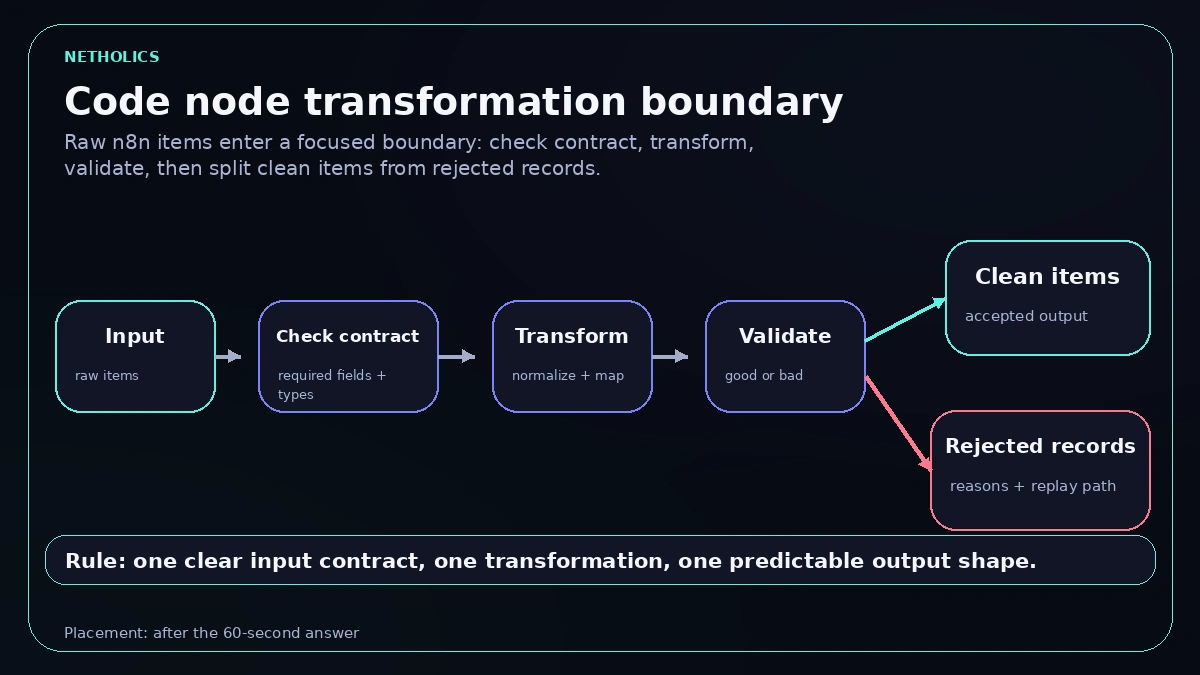
- The safe pattern is input contract, transform, validate, emit clean items, and route bad records separately so one strange payload does not corrupt the whole automation.
When to use the Code node
n8n gives builders many ways to reshape data: Set, Edit Fields, expressions, Merge, Split Out, Aggregate, and the Code node. The Code node is powerful, but power is not the same as clarity. A workflow that hides every decision inside one long script becomes hard to review, hard to hand over, and hard to debug during an incident.
Use the Code node when the transformation has a real algorithm. Examples include grouping line items by customer, normalizing inconsistent CRM fields, deduplicating by composite key, calculating lead scores, splitting good and bad records, or building a payload that depends on several conditions. Those tasks are easier to reason about in JavaScript than in a sprawling canvas of tiny expression nodes.
Avoid Code when the transformation is only a rename, constant value, or one-field expression. Visual nodes are easier for non-developers to inspect, and they make intent obvious in screenshots. A production workflow can mix both approaches: simple mapping stays visual, concentrated logic goes into a short, well-named Code node.
The n8n item model in plain English
Most Code node bugs come from misunderstanding the item model. n8n passes data as an array of items. Each item usually has a json object and may also carry binary data. If the Code node returns the wrong shape, later nodes may fail in confusing ways or silently process fewer records than expected. Set the Code node mode deliberately too: Run Once for All Items runs your script a single time with the whole $input.all() array (the mode used in the examples here), while Run Once for Each Item runs it per item with $json bound to the current item.
The safest mental model is simple: every input item should either produce one clean output item, produce multiple clearly related output items, or move into a rejected path with a reason. If your transformation changes that relationship, name it. A one-to-many split, a many-to-one aggregation, and a filter are different operations and need different tests.
Also be careful with item order and paired data. Some n8n features rely on item linking to connect output items back to their source. When you rebuild arrays manually, keep only the structure you understand and verify downstream nodes with real sample data. Transformation code should make data easier to trust, not harder to trace.
Choose the simplest transformation tool
The Code node is not a badge of sophistication. The right node is the one that makes the transformation obvious to the next operator. Use this table as a quick decision guide.
| Task | Best n8n choice | Reason |
|---|---|---|
| Rename two fields | Set or Edit Fields | Visible, simple, and easy for non-developers to audit. |
| Normalize phone and email | Code node | Small reusable logic with validation and rejected-item reasons. |
| Group line items by invoice | Code node | Requires loops, maps, and careful output shape. |
| Join two API responses | Merge plus light expressions | Keeps source relationships visible unless custom matching is needed. |
| Build a vendor payload | Set for simple payload, Code for conditional payload | Use the least complex tool that keeps the rule readable. |
The production transformation flow
A maintainable Code node has a visible boundary. It receives raw items, checks assumptions, transforms data, validates output, and emits predictable records. If a node does much more than that, split it or move the logic to a dedicated service.
A copy-paste Code node pattern
This example keeps accepted and rejected records in one predictable shape. A later IF node can route status accepted into CRM work and status rejected into a review queue. The important detail is that bad records are explicit, not silently dropped.
// n8n Code node: normalize leads and route rejected records
const output = [];

for (const item of $input.all()) {
  const lead = item.json;
  const errors = [];

  const email = String(lead.email || "").trim().toLowerCase();
  const company = String(lead.company || "").trim();
  const source = String(lead.source || "unknown").trim().toLowerCase();
  const budget = Number(lead.monthly_budget || 0);

  if (!email || !email.includes("@")) errors.push("missing_or_invalid_email");
  if (!company) errors.push("missing_company");
  if (!Number.isFinite(budget) || budget < 0) errors.push("invalid_budget");

  const normalized = {
    email,
    company,
    source,
    monthly_budget: budget,
    qualified: errors.length === 0 && budget >= 1000,
    transformation_version: "lead-normalizer-2026-07-03"
  };

  output.push({
    json: {
      status: errors.length ? "rejected" : "accepted",
      errors,
      lead: normalized,
      original_id: lead.id || null
    }
  });
}

return output;Validation and rejected records
A transformation without validation can make bad data look clean. That is worse than a visible error. When the Code node normalizes fields, it should also record which assumptions were met. Required fields, allowed enum values, numeric ranges, date formats, and duplicate keys are all part of the transformation contract.
Do not throw an execution error for every bad item. If one malformed lead arrives in a batch of one hundred, the business may want ninety-nine records to continue while the bad one goes to review. Throw when the entire operation is unsafe, such as missing configuration or an unexpected input shape. Return rejected records when individual items need human or later automated review.
The rejected path should preserve context. Include the original ID, source system, reason list, and a safe subset of the original payload. Avoid dumping unnecessary personal data into error notifications. A good review queue, fed by an error-workflow pattern, lets an operator fix the source record and replay the item confidently.
A seven-step Code node runbook
Use this runbook whenever a transformation becomes important enough that a broken mapping would affect customers, reporting, billing, or support operations.
- Write the input contract. List required fields, optional fields, types, allowed values, and the system that owns each field.
- Choose the simplest node. Keep simple field moves in Set or Edit Fields, and reserve Code for logic that benefits from JavaScript.
- Normalize before branching. Trim strings, lower-case stable keys, parse numbers, and convert dates before IF nodes or vendor payloads depend on them.
- Emit a stable output shape. Every output item should carry predictable keys, even when the record is rejected.
- Route rejected records deliberately. Send them to a queue, sheet, database, or error workflow with reason codes and replay context.
- Test edge cases. Include nulls, missing fields, duplicates, invalid numbers, unexpected enum values, long text, and multiple items.
- Version important transformations. Add a transformation version or source comment so downstream anomalies can be traced to the logic that created them.
Worked example: form leads to CRM payloads
A website form sends leads with inconsistent fields. Some records have Email, others have email. Company may be blank. Budget may arrive as a string with a currency symbol. Source can be LinkedIn, linkedin, Linked In, or missing. A visual-only workflow quickly becomes messy because every downstream node needs to defend against every variation.
The better design puts one Code node after the trigger. It creates a normalized lead object with email, company, source, budget, qualification flag, and reason codes. The accepted branch creates or updates the CRM record. The rejected branch writes a review item with the original form ID and reason list. Reporting uses the normalized fields rather than each vendor field name.
This design also helps when the form changes. If marketing adds a new source value, the transformation node is the one place to update the mapping. If the CRM rejects a record, operations can inspect the normalized payload and the original ID. The workflow stops being a chain of surprises and becomes a controlled data boundary.
Quality checks before production
A Code node deserves the same review as any small script, and the same testing discipline before it reaches production. Read it for hidden side effects, unclear variable names, unexpected mutation, unbounded loops, and assumptions about item count. If the node calls external systems, reconsider the design. Transformation code is easier to test when it does not also perform network work.
Check performance with realistic batches. A script that is fine for ten items may be slow for ten thousand if it repeatedly scans arrays or builds large strings. For high-volume workflows, watch for repeated full-array scans and expensive work inside nested loops; the batching section below covers the specific fixes.
Finally, test the output with the real downstream node. A transformation can look correct in isolation and still fail because the CRM expects null instead of an empty string, or because a date field requires a timezone. The acceptance test is the downstream system accepting the payload without manual cleanup.
Input and output contracts
The best Code nodes have a small contract that a reviewer can understand without running the whole workflow. The input contract names fields, types, allowed values, nullable values, and the upstream system that owns each field. The output contract names the fields later nodes can rely on. This is not heavy documentation. It is a guardrail against accidental schema drift.
Contracts matter because upstream systems change quietly. A form builder may rename a field, a CRM may start returning null instead of an empty string, or an API may add nested arrays where a single object used to exist. If the Code node has guard clauses and reason codes, those changes become visible rejected records instead of silent bad payloads.
Keep contract notes close to the workflow source, ideally under version control with the workflow. A short comment in the Code node, a private repo note, or a workflow documentation block can be enough. The operator should be able to compare a failing item with the expected contract and decide whether the source system changed, the transformation is wrong, or the downstream system needs a different payload.
Batching and performance boundaries
Data transformation often starts small and later becomes a batch operation. A Code node that processes ten records during testing may receive thousands during an import, a replay, or a nightly sync. That does not mean every workflow needs complex optimization, but it does mean loops and lookups deserve basic review, and that very large volumes may belong behind queue mode and worker scaling.
Prefer maps keyed by stable IDs when joining records. Avoid nested loops over large arrays unless the input size is known and bounded. Parse and normalize once, then reuse the normalized value. If a transformation creates a very large output, consider splitting the workload before expensive downstream calls so failures are easier to replay.
Performance is also about debuggability. A single giant Code node can be fast and still be operationally fragile. When the transformation has separate phases, such as normalize, deduplicate, group, and emit payload, make those phases obvious in the code or split them into separate nodes. The next operator should know where to add a test when a vendor payload changes.
Common Code node mistakes
Returning a raw object. Downstream nodes expect n8n items. Return an array of objects with json payloads unless the node mode requires a different shape.
Dropping bad records silently. Filtered data should be intentional. If a record is rejected, preserve a reason and a replay path.
Turning the workflow into an app. Long scripts with hidden business rules are hard to review. Split the logic or move complex services out of the canvas.
Relying on display strings. Parse stable raw values instead of formatted currency, localized dates, or labels that may change.
Skipping edge-case samples. Nulls, duplicates, malformed payloads, and unexpected arrays are where transformation bugs usually live.
Production acceptance test
The final acceptance test is also simple: a stranger should be able to inspect one accepted output item and one rejected output item and understand why each took its path. If the answer requires stepping through ten hidden assumptions, the transformation is not ready for production ownership. A clean launch proves the same input sample produces the same output shape every time, including rejected records, and that downstream nodes can consume the result without special-case cleanup.
What other experts say
Reference card · n8n data structure docs
The n8n documentation states that data passes between nodes as an array of items, where each item is an object with a json key (and optional binary data), and Code node output must return that same item structure.
Netholics comment: this is the single assumption that breaks most Code node transformations. If your script returns a raw object instead of an array of json-wrapped items, downstream nodes either fail or quietly process the wrong records, so honoring the documented item shape is the foundation of every reliable transformation.
Ship a Code node transformation safely
- Pin the node mode. Decide Run Once for All Items versus Run Once for Each Item before writing logic, and access input with the matching pattern (
$input.all()or$json). - Write the input contract in a comment. List required fields, types, allowed enum values, and which upstream system owns each field at the top of the script.
- Normalize before you branch. Trim strings, lower-case stable keys, parse numbers, and convert dates first so later IF nodes and payloads read clean values.
- Return an array of json-wrapped items. Never return a raw object; every output item should carry predictable keys even when it is rejected.
- Add a status and errors field. Mark each record accepted or rejected with a reason list so an IF node can route good records forward and bad records to review.
- Preserve replay context on rejects. Keep the original ID, source system, and a safe subset of the payload so an operator can fix and re-run the item.
- Test the edge-case sample. Run nulls, missing fields, duplicates, invalid numbers, unexpected enums, and a multi-item batch before connecting any side-effecting node.
- Stamp a transformation version. Add a version or source comment to the output so downstream anomalies trace back to the logic that produced them.
Code node transformation readiness card
| Impact | High. A clean transformation boundary removes defensive logic from every downstream node and makes the whole workflow auditable. |
| Risk | Medium. Wrong output shape or silently dropped records corrupt data quietly; guard clauses and rejected paths contain it. |
| Effort | Low to medium. A focused normalize-and-validate node is fast to build; batching and contracts add modest work for high-volume flows. |
| Best first workflow | Normalizing inconsistent inbound leads or form data into a stable CRM payload with accepted and rejected branches. |
| Do not automate yet | Transformations that hide business rules, call external systems mid-script, or run on unbounded batches without queue mode and tested edge cases. |
Frequently Asked Questions
Q: When should I use the n8n Code node instead of Set or Edit Fields?
Use Set or Edit Fields for simple mapping and renaming. Use the Code node when the transformation needs loops, conditional logic, grouping, deduplication, normalization, or validation that would be harder to understand as many small nodes.
Q: What is the most common Code node mistake in n8n?
The most common mistake is losing item structure. n8n workflows pass arrays of items with json payloads, so Code node output must return items in the expected shape rather than a raw object or a mixed data structure.
Q: Should a Code node throw errors or return rejected items?
Use thrown errors for failures that should stop the execution. Return rejected items or route them to review when one bad record should not block the whole batch.
Q: Can I use external npm packages inside the n8n Code node?
That depends on the hosting configuration and allowed modules. For portable workflows, prefer built-in JavaScript and keep complex package-dependent logic in a dedicated service unless the environment is explicitly controlled.
Q: How do I make Code node transformations easier to maintain?
Keep each Code node focused on one transformation, name the expected input and output fields, include small guard clauses, and add a sample payload in your source documentation or workflow notes.
Q: How should I handle dates and numbers in n8n transformations?
Normalize dates to a chosen timezone or ISO format before downstream use, parse numbers explicitly, and avoid relying on display strings from upstream systems when a stable raw value is available.
Q: How do I test a Code node before production?
Run sample items that cover normal records, missing fields, null values, duplicate records, invalid types, and oversized text. Verify both success output and rejected-item output before connecting side-effecting nodes.
Verified Sources
Make n8n production-safe with Netholics
If your n8n workflows already touch customer systems, the safest next step is a focused audit of inputs, credentials, transformations, failures, and recovery paths before the next automation goes live.