Automate Meeting Notes With AI: From Transcription to Action Items
Build a workflow that turns a meeting recording into a clean summary, recorded decisions, and assigned action items, then routes them to the tools your team already uses.
The 60-second answer
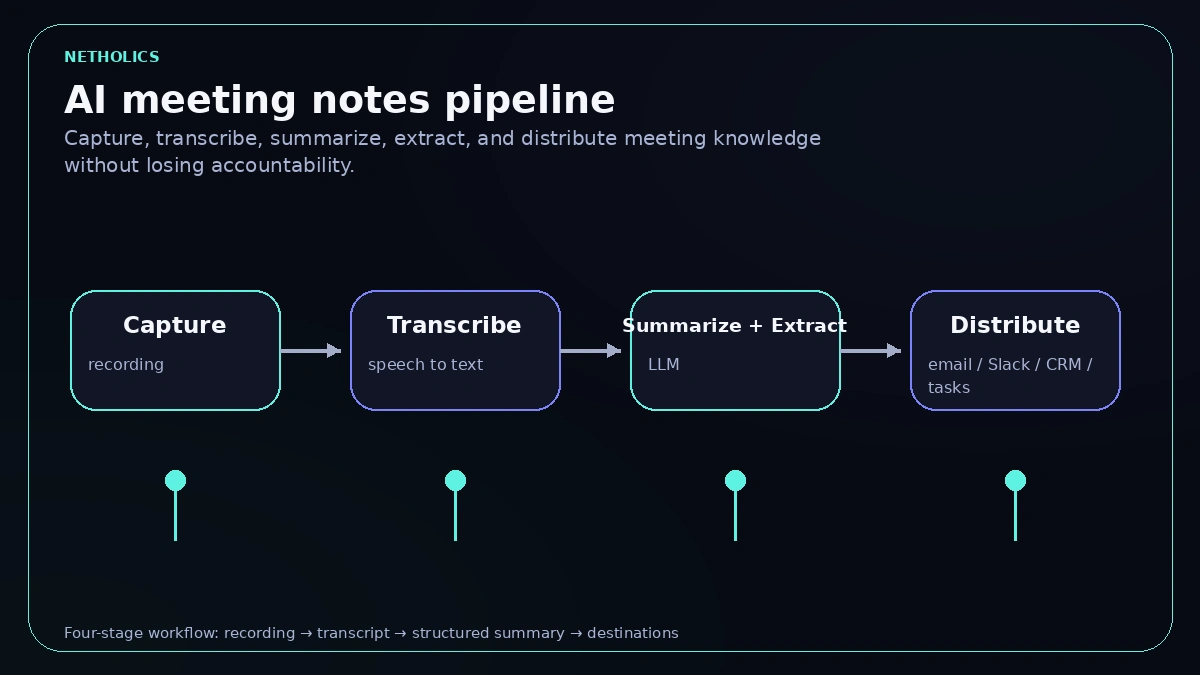
- An AI meeting-notes workflow is a four-stage pipeline: capture the recording, transcribe it to text, use an LLM to produce a summary plus structured decisions and action items, then distribute those to email, Slack, Notion, your CRM, or a task tool.
- The quality of the output depends on two choices most teams get wrong: the transcription engine (and whether it labels who said what) and forcing the model to return a fixed JSON schema instead of free-form prose, so every action item carries an owner and a due date.
- Recording people speaking is regulated. Consent, retention, and which vendor sees the audio are design decisions, not afterthoughts, and a wrong action item routed automatically can cost more than the notes ever saved.
What an AI meeting-notes workflow actually is
The promise is simple: stop paying a human to type up what everyone already heard, and stop losing the decisions and to-dos that get buried in a recording nobody re-watches. The honest version is a small, well-bounded pipeline with four stages, each of which can be swapped independently.
Stage one is capture: get the audio or an existing transcript out of the meeting platform. Stage two is transcription: convert speech to accurate, ideally speaker-labeled text. Stage three is the part that earns its keep, summarize and extract: an LLM compresses the transcript into a short summary and pulls out structured items such as decisions, action items with owners and dates, risks, and follow-ups. Stage four is distribution: the structured result is pushed to the systems where work actually happens.
The reason to think in stages is that failure is local. If summaries are vague, the problem is your extraction prompt, not your transcriber. If names are garbled, the problem is diarization or audio quality, not the model. Building this as a chain of nodes in a tool like n8n keeps each stage observable and replaceable, which is exactly the discipline an n8n automation agency applies to any production workflow. The same extraction backbone underpins broader document processing automation, where the input is a contract or invoice instead of a transcript.
Transcription options and accuracy
Transcription is the foundation. If it is wrong, every downstream summary inherits the error, and the model will confidently attribute a decision to the wrong person. The three things that matter are raw accuracy on your audio, whether the engine does speaker diarization (labeling who spoke each segment), and how the audio reaches the vendor. The table compares the common choices.
| Option | Strengths | Watch-out |
|---|---|---|
| OpenAI Whisper (self-host) | Open-source model you can run on your own hardware, so audio never leaves your infrastructure; strong multilingual accuracy. | The open model does not do speaker diarization on its own; you bolt on a separate tool, and you own the GPU and ops cost. |
| OpenAI speech-to-text API | Managed Whisper-family transcription with no infrastructure to run; simple to call from a workflow node. | Audio is sent to OpenAI; check data-handling terms before routing client recordings through it. |
| Deepgram | Fast, accurate streaming and pre-recorded transcription with built-in diarization and word-level timestamps; good for high volume. | A paid third party; you are sending audio off-site, so consent and a data-processing agreement matter. |
| AssemblyAI | Diarization, timestamps, and audio-intelligence features (topics, sensitive-data redaction) in one API; LLM steps available on top. | Third-party processing again; per-minute cost adds up at scale and needs to sit in your ROI model. |
| Platform-native captions | Zoom, Teams, and Meet can export a transcript directly, removing the transcription stage entirely. | Quality and speaker labels vary, punctuation is often weak, and you are still bound by that platform’s recording and retention settings. |
Accuracy is usually reported as word error rate, and it degrades fast with crosstalk, accents, jargon, and poor microphones, not with the engine alone. Treat any vendor’s headline accuracy figure as a best case on clean audio. The cheapest reliable win is better input: ask participants to use decent microphones and avoid talking over each other, because no model fully recovers two people speaking at once. If you need names attached to action items, diarization is not optional, which pushes most teams toward Deepgram, AssemblyAI, or Whisper plus a diarization add-on.
Producing structured output, not a wall of text
The biggest mistake is asking the model for “notes” and getting back a paragraph. Prose cannot be routed. An action item buried in a sentence has no owner field to assign in your task tool and no due date to set a reminder on. The fix is to make the model return structured data against a fixed schema, so every item lands in a known field. Modern APIs support this directly: OpenAI’s Structured Outputs can constrain a response to a JSON Schema, and Anthropic’s Claude returns structured data reliably through tool/function definitions.
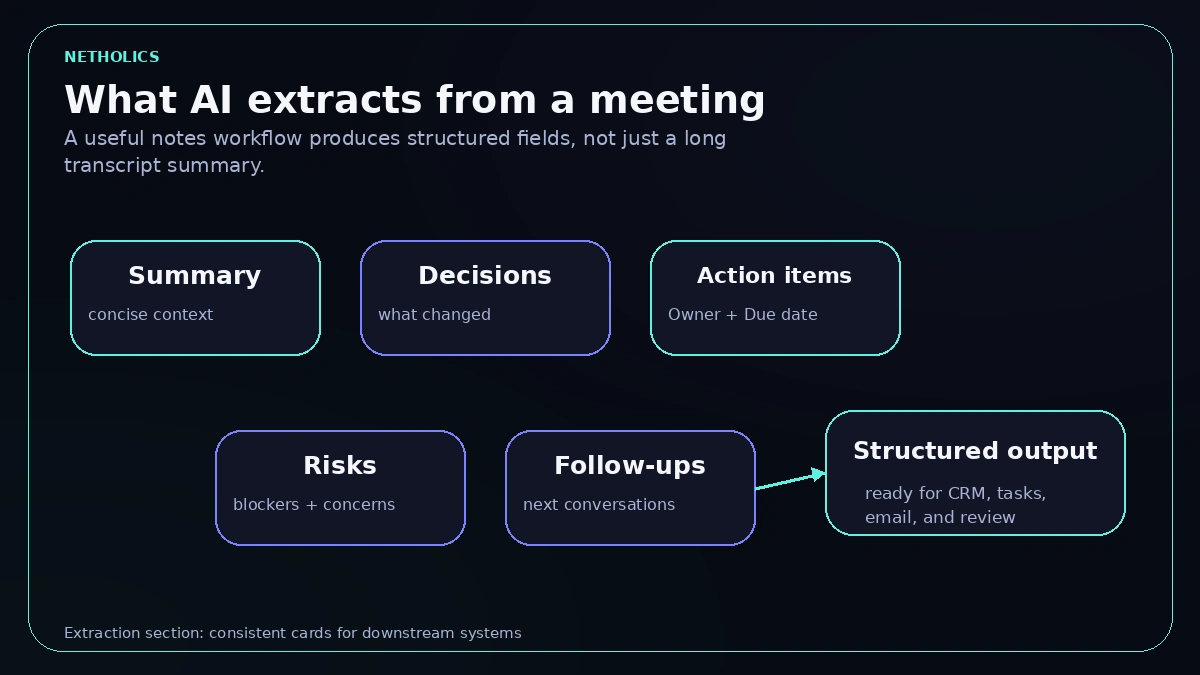
Decide what you extract before you write a prompt. The table maps each thing worth pulling out to a concrete output field and type, which becomes your schema in the next section.
| What to extract | Output field / type |
|---|---|
| One-paragraph summary | summary — string, 3 to 5 sentences. |
| Decisions made | decisions[] — array of strings; each a single resolved decision. |
| Action items | action_items[] — array of objects: task, owner, due_date (ISO date or null), priority. |
| Risks / blockers | risks[] — array of strings; things flagged as concerns. |
| Open questions / follow-ups | follow_ups[] — array of strings needing a later answer. |
| Confidence / gaps | uncertain — array of strings the model was unsure about, for human review. |
Two fields earn their place quietly. Forcing due_date to be an ISO date or an explicit null stops the model from inventing a deadline nobody set. And an uncertain array gives the model permission to flag what it could not pin down, which is far safer than a confident guess that becomes a wrongly assigned task.
The four-stage pipeline at a glance
The extraction prompt and JSON schema
This is the core of the workflow: a system prompt that sets the rules and a JSON Schema the model must satisfy. Pass the schema to the API’s structured-output / response-format option (OpenAI) or as a tool input schema (Anthropic) so the response is guaranteed to be valid JSON, then parse it in the next workflow node.
# SYSTEM PROMPT (extraction)
You convert meeting transcripts into structured records.
Rules:
- Use ONLY facts present in the transcript. Do not invent owners or dates.
- An action item needs a clear task. Set owner to the named person, or null.
- Set due_date only if a specific date/deadline was stated; otherwise null.
- Put anything you are unsure about into "uncertain" for human review.
- Keep the summary to 3-5 sentences, neutral and factual.

# RESPONSE JSON SCHEMA (passed to the model as the required output shape)
{
  "type": "object",
  "additionalProperties": false,
  "required": ["summary", "decisions", "action_items", "risks", "follow_ups", "uncertain"],
  "properties": {
    "summary":     { "type": "string" },
    "decisions":   { "type": "array", "items": { "type": "string" } },
    "action_items": {
      "type": "array",
      "items": {
        "type": "object",
        "additionalProperties": false,
        "required": ["task", "owner", "due_date", "priority"],
        "properties": {
          "task":     { "type": "string" },
          "owner":    { "type": ["string", "null"] },
          "due_date": { "type": ["string", "null"], "description": "ISO 8601 date or null" },
          "priority": { "type": "string", "enum": ["high", "medium", "low"] }
        }
      }
    },
    "risks":      { "type": "array", "items": { "type": "string" } },
    "follow_ups": { "type": "array", "items": { "type": "string" } },
    "uncertain":  { "type": "array", "items": { "type": "string" } }
  }
}
Because the schema sets additionalProperties: false and lists every required field, the model cannot return half an action item or drop the uncertain array. That predictability is what lets the distribution stage map fields to a CRM or task tool without defensive guesswork.
Handling long transcripts
A one-hour meeting can run to roughly 8,000 to 10,000 words, and a full-day workshop far beyond any single context window. Stuffing the whole transcript into one call is unreliable and expensive, and the model tends to lose detail from the middle of very long inputs. The standard fix is map-reduce summarization.
Split the transcript into overlapping chunks that respect speaker turns rather than cutting mid-sentence — a small overlap between chunks preserves context across the seam. In the map step, summarize and extract items from each chunk independently. In the reduce step, feed those partial results back to the model to merge into one summary and one de-duplicated action-item list. Chunking by topic or agenda item, where the meeting has one, produces cleaner seams than chunking by raw token count.
Two practical cautions. De-duplication matters: the same decision mentioned in three chunks must not become three action items, so the reduce prompt should explicitly merge duplicates. And cost scales with the number of chunks and the model you pick, so a long-transcript workflow is exactly where token spend can quietly balloon; keep it inside the same ROI math you would apply to any automation.
Recording consent, PII, and which vendor sees what
Recording a conversation is regulated, and the rules differ by jurisdiction. Some places require only one party’s consent, others require all parties to agree before a recording starts, and getting this wrong is a legal problem, not a product one. The safe default is explicit, announced consent at the top of every recorded meeting, plus a clear retention policy for how long audio and transcripts are kept.
Then decide what leaves your network. Audio and transcripts routinely contain personal data, client confidential information, and commercial secrets. Each external vendor in the chain — the transcription API, the LLM provider, the destination tools — is another party processing that data, which under GDPR means a lawful basis and a data-processing agreement. If sensitivity is high, a self-hosted Whisper plus a self-hosted or contractually covered model keeps audio inside your perimeter; if it is lower, a managed API with the right agreement is reasonable. Many transcription vendors also offer automatic PII redaction you can apply before the text reaches the LLM. The full obligations are covered in our guide to GDPR and AI automation, and the same care applies when the pipeline emails results out, as in safe AI email automation.
Per-meeting-type templates
One generic prompt produces generic notes. A sales call, a standup, and a client review want different things extracted, so branch the workflow on meeting type (set it at capture, or detect it) and swap the extraction instructions accordingly.
- Sales call. Extract the prospect’s stated needs, objections, budget and timeline signals, the agreed next step, and any CRM fields to update. The most valuable output is the next action and who owns it, routed straight to the deal record.
- Team standup. Extract per-person updates, blockers, and commitments for the day. Keep it terse; the value is a scannable blocker list, not a transcript.
- Client review. Extract decisions, scope changes, risks, and dated deliverables. This is the meeting where a missed action item damages a relationship, so bias toward flagging uncertainty over guessing.
Each template is the same schema with a different system prompt and different distribution rules. That keeps the pipeline single while the output stays fit for purpose. Capturing those differences up front is easier with a short automation requirements document so everyone agrees what “good notes” means per meeting type.
Build runbook
This is the order to build it in n8n (or any workflow tool) so each stage is verified before the next depends on it. Each step leaves something you can test.
- Trigger and capture. Start from a recording landing in storage, a webhook from your meeting platform, or a manual upload. Pull the audio file or the platform transcript and the meeting metadata (title, date, type, participants).
- Transcribe. Send the audio to your chosen engine with diarization enabled, or skip this if you already have a platform transcript. Store the raw transcript so you can reprocess without re-transcribing.
- Pre-process. Normalize speaker labels, optionally run PII redaction, and if the transcript is long, split it into overlapping, speaker-aware chunks for map-reduce.
- Extract. Call the LLM with the system prompt and the JSON Schema as the required output shape. For long inputs, run the map step per chunk, then a reduce step to merge and de-duplicate.
- Validate. Parse the JSON and check it against the schema. If owners or dates are missing on high-priority items, or the
uncertainarray is non-empty, route to a human-review step instead of straight to distribution. - Distribute. Map the structured fields to each destination: a summary to Slack and email, decisions to a Notion page, action items to the task tool with owner and due date, and sales fields to the CRM record.
- Log and monitor. Record token cost, processing time, and review outcomes per run so you can track accuracy and spend over time and catch drift early.
Worked example: a weekly client call
Take a recurring 45-minute weekly call between an agency and a client. The recording lands in a shared drive, which fires the workflow. The audio goes to a transcriber with diarization, returning a speaker-labeled transcript of roughly 6,000 words — short enough to skip chunking. The extraction call returns this structured result:
{
  "summary": "Weekly sync on the Q3 campaign. The client approved the
    revised landing-page copy and asked to pause paid social until the new
    creative is ready. Reporting cadence was confirmed as weekly.",
  "decisions": [
    "Approve revised landing-page copy.",
    "Pause paid social until new creative ships."
  ],
  "action_items": [
    { "task": "Send the new landing-page copy to dev for build",
      "owner": "Maria", "due_date": "2026-07-08", "priority": "high" },
    { "task": "Brief the design team on the paused-creative refresh",
      "owner": "Andrew", "due_date": "2026-07-10", "priority": "medium" },
    { "task": "Set up the weekly reporting dashboard",
      "owner": "Maria", "due_date": null, "priority": "low" }
  ],
  "risks": ["Paused paid social may dip lead volume for ~2 weeks."],
  "follow_ups": ["Confirm whether the client wants SMS in scope."],
  "uncertain": ["No explicit date given for the reporting dashboard."]
}
Distribution then runs automatically: the summary and decisions post to the client Slack channel and an email recap, the three action_items become tasks in the project tool with their owners and due dates set, and the agreed next step plus the SMS follow-up are written to the client’s CRM record. The one item with a null due date and the entry in uncertain are flagged for a human to confirm before the reminder is created — the model did not invent a date it never heard, which is exactly the behavior the schema and prompt were designed to enforce.
Where humans should still check
Notes feel low-stakes until an automation acts on a wrong one. A misattributed decision, a task assigned to the wrong person, or an invented deadline can send real work in the wrong direction, and the cost of untangling it often exceeds the minutes the automation saved. So keep a human in the loop where the blast radius is largest.
The pragmatic rule is to automate distribution of the low-risk, reversible output and gate the rest. A summary posted to a channel is easy to correct; a task auto-assigned with a hard deadline, a CRM field that drives forecasting, or anything sent to a client should pass a quick human glance first, especially while trust is being built. The uncertain array makes this cheap: review only the items the model flagged, not the whole transcript. As accuracy proves out per meeting type, taper the review on the branches that have earned it. This is the same human-in-the-loop discipline that governs any serious build, whether you wire it yourself or commission custom AI agent development.
What other experts say
Reference card · OpenAI Structured Outputs
OpenAI documents that Structured Outputs reliably constrains a model’s response to a supplied JSON Schema, so the required fields are present and correctly typed every time.
Netholics comment: this is the whole game for meeting notes. When the extraction step is schema-constrained, every action item arrives with an owner, a due date, and a priority in known fields, so the distribution stage can route them to a task tool or CRM without defensive parsing or manual cleanup.
Ship your meeting-notes pipeline without surprises
- Confirm consent and retention first. Decide your jurisdiction’s consent rule, add an announced consent step at the top of every recorded meeting, and set how long audio and transcripts are kept before you wire any automation.
- Turn on diarization at the source. Enable speaker labeling in your transcription engine, or pair self-hosted Whisper with a diarization tool, so action items can carry the correct owner.
- Store the raw transcript. Persist the transcript before extraction so you can reprocess after a prompt change without paying to re-transcribe.
- Pass a JSON Schema, not a “give me notes” prompt. Send your schema as the required output shape with
additionalPropertiesset to false and every field marked required, so the model cannot return half an action item. - Force due_date to an ISO date or explicit null. This stops the model inventing a deadline nobody stated, and keep an
uncertainarray so it can flag what it could not pin down. - Add a map-reduce branch for long transcripts. Split into overlapping, speaker-aware chunks, extract per chunk, then merge and explicitly de-duplicate so one decision mentioned three times is not three tasks.
- Gate high-stakes distribution behind a human glance. Auto-send summaries; route hard-deadline tasks, CRM forecasting fields, and anything client-facing to review when the
uncertainarray is non-empty. - Log cost and review outcomes per run. Track token spend, processing time, and how often humans corrected the output so you can taper review where accuracy has proven out.
Meeting-notes automation readiness card
| Impact | High. Removes manual write-ups and stops decisions and action items getting lost in recordings nobody re-watches. |
| Risk | Medium. Recording is regulated, transcripts hold personal data, and a wrongly assigned task can cost more than the notes saved. |
| Effort | Low to medium. A four-stage pipeline of off-the-shelf parts; effort rises with diarization, long-transcript map-reduce, and per-meeting templates. |
| Best first workflow | A recurring internal meeting where the summary and decisions auto-post to a channel while action items wait for one human glance. |
| Do not auto-send yet | Client-facing recaps, hard-deadline task assignments, and CRM fields that drive forecasting until accuracy has proven out per meeting type. |
Frequently Asked Questions
Q: How do I automate meeting notes with AI?
Build a four-stage pipeline: capture the recording or transcript, transcribe it to speaker-labeled text, use an LLM to produce a summary and extract structured items (decisions and action items with owners and dates), then distribute the result to Slack, email, Notion, your CRM, or a task tool. The key is forcing the model to return a fixed JSON schema rather than free text, so each item lands in a routable field. A workflow tool such as n8n chains the stages so each one is observable and replaceable.
Q: Which transcription engine is most accurate?
There is no single winner; accuracy depends mostly on your audio quality, not the engine. OpenAI’s Whisper, Deepgram, and AssemblyAI all transcribe well on clean audio, and accuracy drops sharply with crosstalk, accents, jargon, and poor microphones. If you need names attached to action items, choose an engine with speaker diarization built in, like Deepgram or AssemblyAI, or pair self-hosted Whisper with a diarization tool. The cheapest reliable improvement is better input audio.
Q: How do I get structured action items instead of a paragraph?
Ask the model for structured data against a fixed JSON schema, not for notes. OpenAI’s Structured Outputs can constrain a response to a JSON Schema, and Anthropic’s Claude returns structured data reliably through tool definitions. Define an action_items array where each object has task, owner, due_date, and priority fields, set additionalProperties to false, and mark fields required. The model then cannot return half an item, and the distribution stage can map each field directly to a task tool or CRM.
Q: How do I handle a transcript longer than the context window?
Use map-reduce summarization. Split the transcript into overlapping, speaker-aware chunks, summarize and extract items from each chunk independently in the map step, then merge and de-duplicate those partial results into one summary and one action-item list in the reduce step. Chunk by topic or agenda item where possible for cleaner seams, and make the reduce prompt explicitly merge duplicates so one decision mentioned three times does not become three tasks.
Q: Is it legal to record meetings for AI note-taking?
It depends on jurisdiction. Some regions require only one party’s consent to record, others require all parties to agree before recording starts, so getting it wrong is a legal risk. The safe default is explicit, announced consent at the start of every recorded meeting plus a clear retention policy. Recordings also contain personal data, so under regimes like GDPR you need a lawful basis and a data-processing agreement with each vendor that handles the audio or transcript.
Q: What data should I send to which vendor?
Treat every external service as a separate data processor. If sensitivity is high, run self-hosted Whisper and a self-hosted or contractually covered model so audio never leaves your network. If sensitivity is lower, a managed transcription and LLM API is reasonable provided you have the right data-processing agreements. Many transcription vendors offer automatic PII redaction, so you can strip personal data before the text reaches the LLM, and you should minimize how long raw audio is retained.
Q: Can the workflow assign tasks automatically to a CRM or task tool?
Yes, and that is the point of structured output. Once the model returns action items as objects with owner, due_date, and priority fields, the distribution stage maps them straight into your task tool or CRM. The safer pattern is to auto-distribute low-risk, reversible output like summaries while gating high-stakes assignments behind a quick human review, particularly anything with a hard deadline, anything that drives forecasting, or anything sent to a client.
Q: Where do humans still need to review AI meeting notes?
Review where a wrong item has the largest blast radius: tasks assigned with hard deadlines, CRM fields that drive forecasting, and anything sent to a client. A summary in a channel is easy to correct, so it can flow automatically. Use the model’s uncertain array to make review cheap, checking only the items it flagged rather than the whole transcript, and taper review on meeting types where accuracy has proven out over time.
Verified Sources
Turn your meetings into action with Netholics
We design transcription-to-action pipelines that produce structured, routable notes, respect recording and privacy rules, and keep a human on the items that matter. Start with an audit and we will map the workflow to your tools and meeting types.