Make to n8n Migration Checklist: Move Scenarios Without Breaking Revenue Workflows
A practical checklist for teams that have outgrown Make, want more control in n8n, and cannot afford silent failures during the switch.
The 60-second migration answer
- Do not rebuild Make scenarios directly node-for-node. First inventory triggers, filters, credentials, payload shapes, schedules, owners, and failure paths.
- The safest migration pattern is freeze → rebuild → mirror → switch → monitor. It turns a risky platform move into a sequence of reversible decisions.
- n8n can be a better long-term automation layer when you need workflow ownership, custom code, self-hosting options, and clearer handoff discipline—but only if you treat the migration like production operations.
Why teams move from Make to n8n
Most migrations do not start because Make stopped working. They start because the automation estate became hard to reason about: too many scenarios, too many one-off fixes, too little confidence about what happens when a webhook changes or an API returns a weird payload.
n8n is attractive because it gives technical teams a more inspectable workflow model, flexible nodes, code-friendly expressions, self-hosting options, and a strong fit for API-heavy operations. That does not make migration automatic. A Make scenario is not just a diagram; it contains assumptions about timing, data shape, router branches, app modules, retries, and who knows how to fix it at 9 p.m.
The right goal is not move everything to n8n. The goal is to move the workflows that deserve ownership, observability, and future extension while retiring the automation debt that should not be copied.
Start with the scenario inventory, not the editor
Before opening n8n, make a list of every Make scenario and score it on business impact, trigger type, connected apps, data sensitivity, schedule frequency, current failure rate, and whether someone depends on it daily. This prevents a classic migration mistake: spending the first week rebuilding low-value workflows while the fragile revenue automations stay undocumented.
For each scenario, capture one real payload sample, one success output, and one known failure case. If the scenario uses routers or filters, write the branch rules in plain English. If it sends emails, creates invoices, syncs orders, updates CRM stages, or touches inventory, mark it as revenue-sensitive and require a mirror run before cutover.
At Netholics, we treat this inventory as the beginning of an AI systems audit, not admin paperwork. The migration tells you which automations are reliable assets and which ones are undocumented liabilities.
Map Make concepts to n8n equivalents
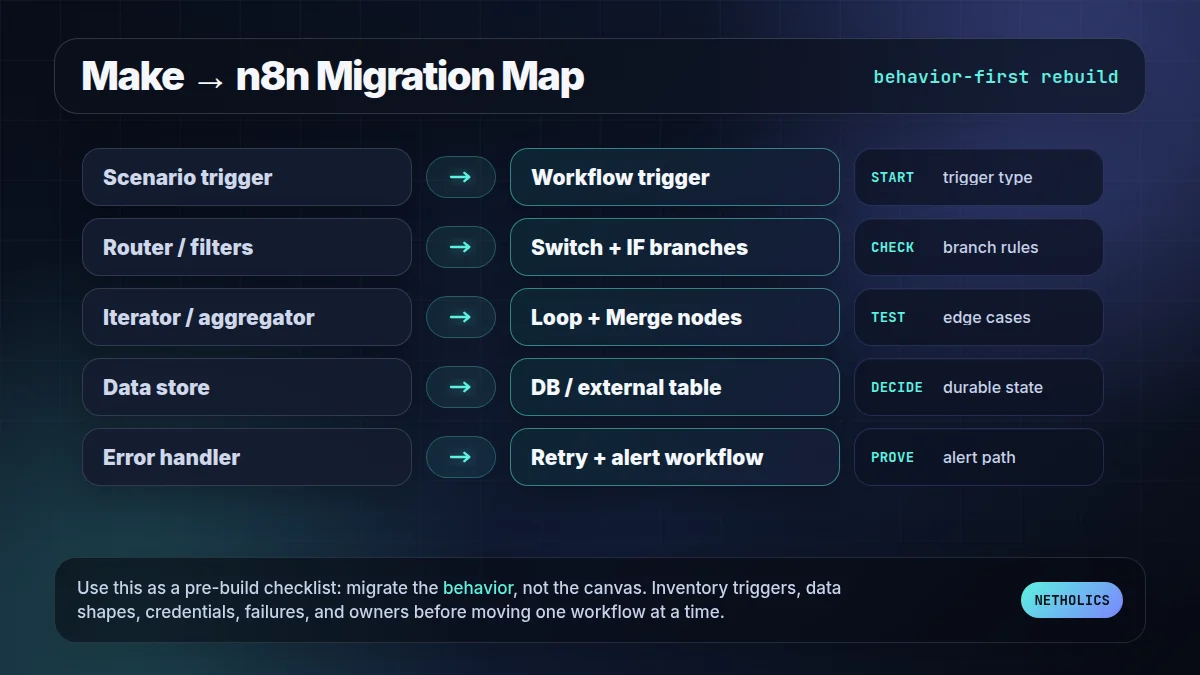
There is no magic importer that turns a production Make estate into a clean n8n system. The useful work is mapping behavior: what starts the workflow, how data moves, how branches are selected, how errors are handled, and what output proves success.
| Make concept | n8n equivalent | Migration note |
|---|---|---|
| Scenario | Workflow | Rebuild one scenario as one workflow first, then split only if ownership or failure isolation requires it. |
| Router and filters | Switch, IF, and branch logic | Document branch rules before rebuilding; hidden filters are a common cause of mismatched outputs. |
| Iterator / aggregator | Split in Batches, Loop Over Items, Merge | Test with empty arrays, one item, and many items; batching bugs hide until volume changes. |
| Data store | Database node, static data, Airtable, Sheets, or external store | Do not copy state blindly. Decide what should be durable, queryable, and backed up. |
| Error handler | Error workflow, retries, alerting, and execution logs | Recreate failure behavior intentionally; do not assume the default retry posture matches Make. |
The migration map to use before rebuilding
Use the map below as the quick visual QA pass before rebuilding: each Make behavior needs an n8n equivalent, a test case, and a failure path. If a row cannot be filled in, that workflow is not ready for cutover.
A safer one-day cutover board
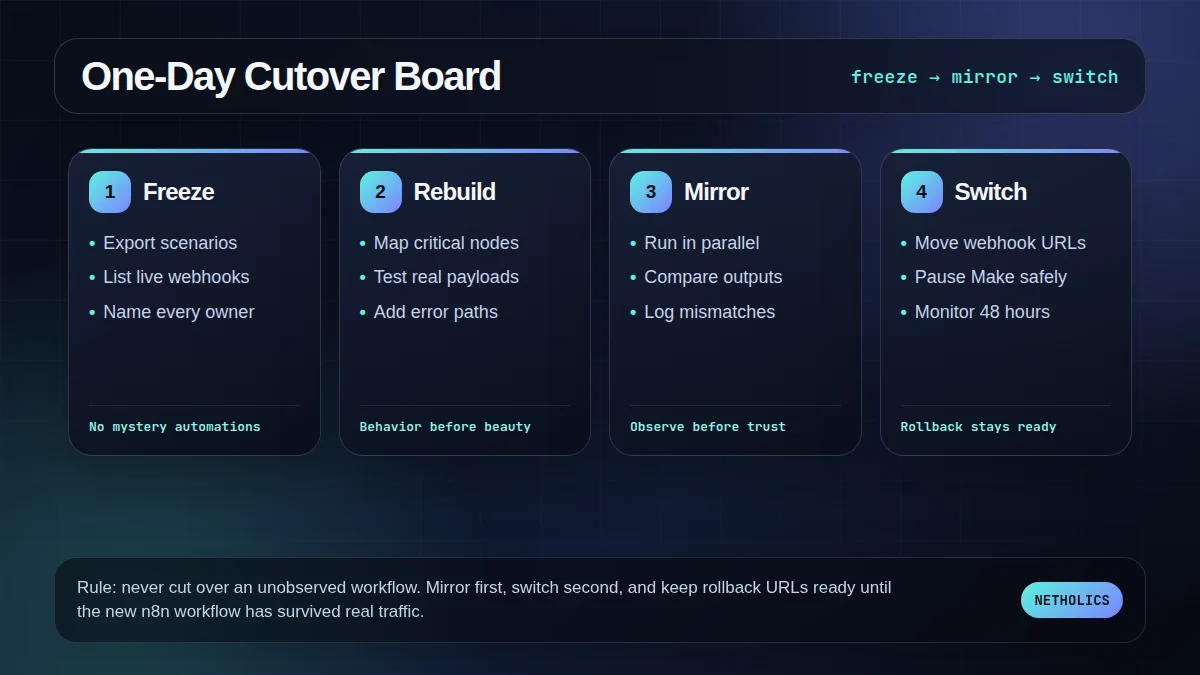
The board is the operating rhythm for sensitive migrations: freeze what exists, rebuild the critical path, mirror with real traffic, then switch only when rollback is still easy.
The 15-step Make to n8n checklist
- Freeze the Make inventory. Export or document every scenario, schedule, trigger, app, owner, and business purpose.
- Rank workflows by risk. Mark revenue, customer support, billing, inventory, and lead-routing scenarios as high risk.
- Capture payload samples. Save real inputs and outputs for success, empty data, and known failure cases.
- List credentials and secrets. Identify which credentials move, which rotate, and which should be replaced with cleaner access scopes.
- Translate branch logic. Write router filters and conditional paths in English before building Switch or IF nodes.
- Rebuild the smallest representative workflow. Choose one workflow that includes an API call, branch, transform, and notification.
- Add explicit error handling. Use error workflows, retry decisions, and alerts before the workflow is business-critical.
- Normalize data shapes. Use expressions and mapping rules deliberately; do not rely on lucky field names.
- Mirror before switching. Run Make and n8n in parallel where possible and compare outputs.
- Protect webhook URLs. Inventory every inbound webhook and plan the exact moment the source system switches.
- Check timezones and schedules. Scheduled automations fail quietly when timezone assumptions move between platforms.
- Load-test volume-sensitive paths. Test batches, loops, and rate-limited API calls with realistic item counts.
- Write rollback steps. Keep the Make scenario paused, not deleted, until n8n proves stable.
- Monitor for 48 hours. Watch failures, execution duration, API limits, and business outputs after cutover.
- Retire migration debt. Delete unused branches, name nodes clearly, and update the internal runbook.
What platform docs quietly imply
Reference card · n8n workflow docs
n8n’s workflow documentation centers on workflows, nodes, executions, credentials, expressions, data mapping, and error handling—not just a visual canvas.
Netholics comment: that is the migration lesson. A Make-to-n8n project succeeds when it rebuilds the operating model around execution visibility and ownership, not when it copies boxes from one canvas to another.
Implementation checks before you touch production
- Webhook parity. Confirm the old Make webhook, the new n8n webhook, expected HTTP method, auth, and payload format.
- Credential rotation. Migrations are a good moment to replace over-permissioned API keys and document owner access.
- Branch parity. For every Make router path, create a sample payload that should enter it and one that should not.
- Failure alerts. Decide who is alerted, where the alert goes, and which failures are allowed to retry silently.
- Business-output test. Validate the result the company cares about: lead created, order tagged, invoice sent, ticket routed, or report delivered.
- Runbook handoff. Record how to pause, replay, and roll back the workflow before the person who built it logs off.
Migration readiness decision card
| Impact | High when Make scenarios drive leads, orders, customer updates, reporting, or internal handoffs. |
| Risk | Medium to high if webhooks, billing, inventory, or customer messages are involved. |
| Effort | Low for a few simple scenarios; project-level effort for 20-plus workflows with hidden branch logic. |
| Best first workflow | One representative workflow with a trigger, branch, API call, transform, and notification. |
| Do not automate yet | Do not move workflows nobody understands, workflows with unclear owners, or automations that lack a success signal. |
Make to n8n migration FAQ
Q: Is n8n a direct replacement for every Make scenario?
No. Simple triggers, API calls, filters, and data transforms usually map cleanly, but app-specific Make modules, aggregators, and edge-case error handlers need a rebuild plan rather than a blind import.
Q: Should I migrate every Make scenario at once?
No. Start with one low-risk but representative workflow, mirror outputs, then move revenue-sensitive automations only after you know how credentials, retries, and webhook URLs behave in n8n.
Q: What is the biggest Make to n8n migration risk?
The biggest risk is not node mapping; it is hidden behavior such as retries, timezone assumptions, payload shapes, router filters, and undocumented manual fixes that only live in the old scenario.
Q: How long does a Make to n8n migration take?
A small business can often migrate a few straightforward scenarios in a day, but 20-plus production scenarios should be treated as a staged project with inventory, tests, monitoring, and rollback.
Q: Do I need self-hosted n8n for the migration to be worth it?
Not always. Self-hosting gives more infrastructure control, but the first decision is operational: whether n8n gives your team better workflow visibility, versioning discipline, and long-term ownership than the current Make setup.
Verified Sources
Need the move done without breaking workflows?
Netholics can audit your Make scenarios, identify what should move to n8n, rebuild the highest-value workflows, and leave you with a runbook your team can actually operate.