AI Automation for Healthcare Clinics: Safer Workflows Beyond Diagnosis
A practical clinic playbook for automating administrative flow while keeping diagnosis, treatment, record access, privacy decisions, and urgent escalation with qualified people.
The 60-second answer
- Start with administrative queues such as appointment requests, referral packets, eligibility follow-up, document routing, and approved reminders—not clinical judgment.
- Map protected health information before connecting tools; minimize fields, roles, retention, exports, logs, and vendor access.
- Require a named human gate for ambiguous symptoms, urgent messages, record corrections, coverage disputes, and anything that could change care.
- Measure queue time, completeness, handoff quality, exception rate, and access-control failures instead of claiming that automation improves clinical outcomes.
Begin with the decision boundary
Clinics often have fragmented intake forms, phone queues, referral documents, scheduling systems, portals, billing tools, and shared inboxes. Staff re-enter the same information and spend time finding the next responsible person. That is an operations problem, but the data moving through it may be sensitive and the consequence of a wrong route can be serious.
The safest first automations do not interpret symptoms or recommend care. They validate required fields, create a reviewable work item, route it to an authorized queue, send approved status messages, and stop when identity, consent, urgency, or record accuracy is uncertain.
A clinic should decide which entities and business associates are involved, which safeguards apply, and what contractual or legal review is required. A workflow diagram cannot substitute for that determination.
A five-stage human-owned workflow
The same control pattern can support several operational queues without pretending that every decision is automatable. Each stage creates an inspectable record and can stop safely.
- Capture the request. Collect the minimum approved source fields and preserve who or what supplied them.
- Validate context. Confirm identity, record, scope, destination, required fields, and applicable policy state.
- Create reviewable work. Classify and transform into a draft task, packet, response, or exception without making the protected decision.
- Apply the human gate. Send consequential, sensitive, ambiguous, or low-confidence work to the named authorized owner.
- Record and improve. Preserve source, transformation version, reviewer, outcome, correction, and follow-up evidence.
Five workflows worth evaluating first
These are candidate operating patterns, not universal approvals. Start where the input is governed, the output is reviewable, and a named owner already manages the exception.
| Workflow | Bounded input | Automation role | Human gate | Operating measure |
|---|---|---|---|---|
| Appointment request intake | Patient-approved contact details and requested service | Validate required fields, deduplicate, create scheduling task | Scheduler confirms identity, urgency, provider and slot | Time to first human scheduling action |
| Referral packet routing | Referral metadata and approved documents | Check completeness, label document class, route queue | Authorized staff verify recipient and missing clinical context | Complete packets accepted without rework |
| Eligibility follow-up | Minimum coverage fields and payer response | Track request state and missing items | Billing staff resolve denials, discrepancies and benefit meaning | Open eligibility exceptions by age |
| Approved reminders | Confirmed appointment and communication preference | Send approved reminder and capture delivery state | Staff handle replies, cancellations and sensitive questions | Confirmed or rescheduled appointments |
| Records request workflow | Verified request metadata and document scope | Create task, deadline and audit trail | Authorized records staff approve identity, scope and release | Requests completed with recorded approval |
Four failures to design out
The primary risk is rarely a malformed prompt. It is an operating system that hides provenance, expands authority, or makes an exception look routine.
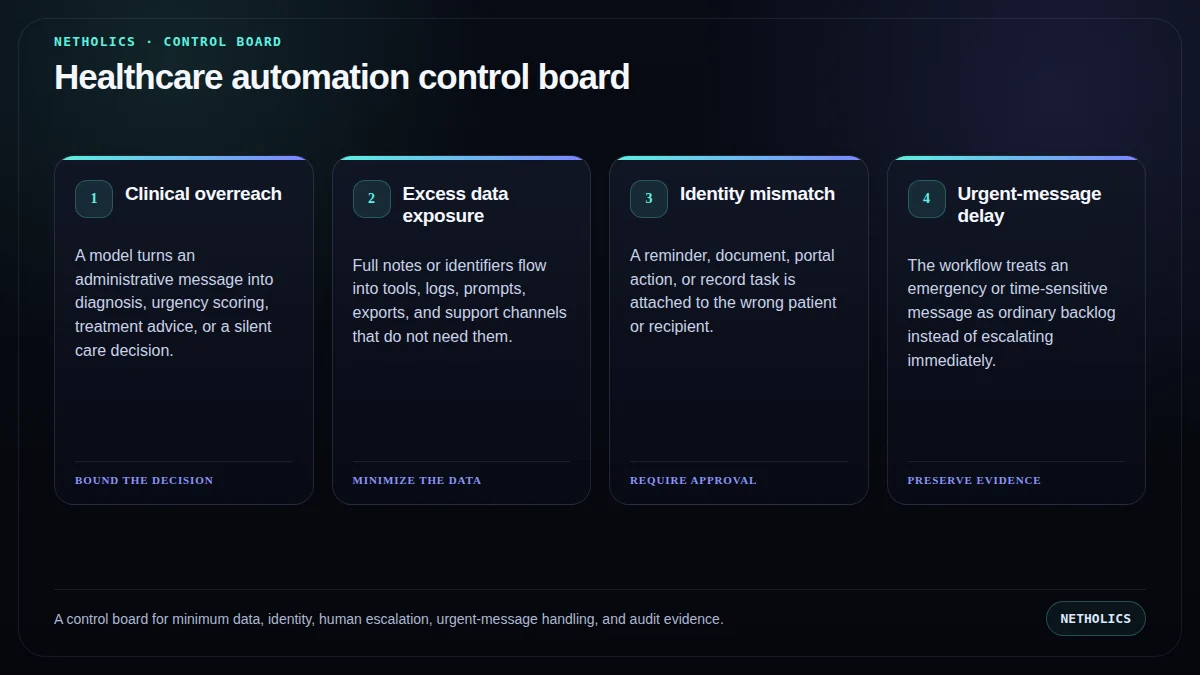
Clinical overreach failure
A model turns an administrative message into diagnosis, urgency scoring, treatment advice, or a silent care decision.
Excess data exposure failure
Full notes or identifiers flow into tools, logs, prompts, exports, and support channels that do not need them.
Identity mismatch failure
A reminder, document, portal action, or record task is attached to the wrong patient or recipient.
Urgent-message delay failure
The workflow treats an emergency or time-sensitive message as ordinary backlog instead of escalating immediately.
Measure service quality, not the AI story
Lock definitions before the pilot. Segment clean-path work from exceptions and preserve the denominator, time window, owner, and correction history.
| Metric | Definition | Review use |
|---|---|---|
| Administrative cycle time | Elapsed time from complete request to the next authorized human action, segmented by workflow and exception state. | Open a diagnostic queue; do not convert the signal into an unsupported outcome claim. |
| First-pass completeness | Share of packets or requests that contain the required administrative fields without a second collection cycle. | Open a diagnostic queue; do not convert the signal into an unsupported outcome claim. |
| Human-escalation precision | Exceptions routed to the correct authorized queue without suppressing uncertainty or urgency. | Open a diagnostic queue; do not convert the signal into an unsupported outcome claim. |
| Access and disclosure exceptions | Wrong-recipient, excessive-access, export, logging, and identity-verification events requiring review. | Open a diagnostic queue; do not convert the signal into an unsupported outcome claim. |
A minimal control record
Keep source facts, automation output, human decisions, and final system state separate. The record should be understandable after the model, vendor, staff member, or interface changes.
workflow: clinic-appointment-request
classification: administrative-only
minimum_fields: [contact_preference, requested_service, availability]
prohibited_actions: [diagnosis, treatment_advice, urgency_downgrade]
human_gate:
  owner: scheduling-team
  required_before: [booking, record_change, sensitive_reply]
exception_routes: [identity_mismatch, urgent_message, clinical_question]
audit: [source, timestamp, state, reviewer, outcome]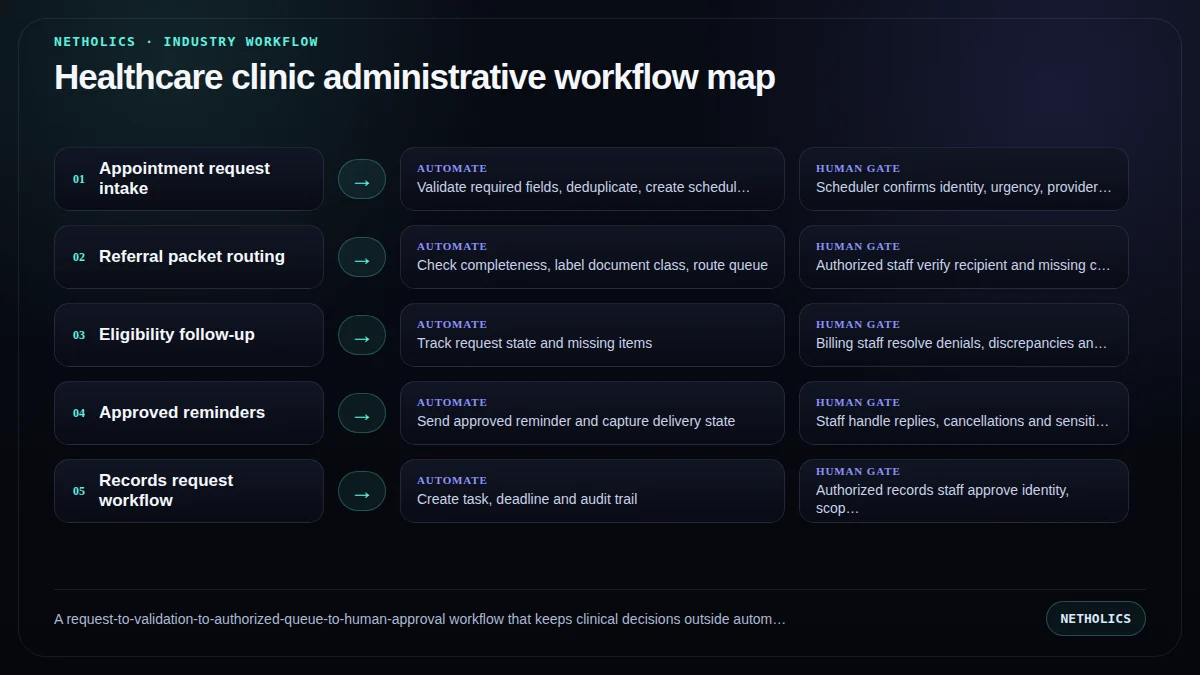
A practical implementation runbook
- Name the protected decision. Write what the system must never decide, send, change, approve, or suppress autonomously.
- Map data and authority. Inventory source systems, sensitive fields, identities, credentials, vendors, destinations, retention, and write permissions.
- Choose one bounded queue. Start with one appointment-request channel with approved fields, no free-text clinical interpretation, a scheduler approval queue, and an urgent-message escape path.
- Build exception-first. Define identity mismatch, missing data, conflict, low confidence, sensitive content, urgency, and policy exception routes before the clean path.
- Run in shadow mode. Compare proposed classifications and drafts with the existing process; record corrections without letting the workflow act.
- Approve a narrow production scope. Allow only the tested inputs, destinations, actions, owners, hours, volumes, and rollback conditions.
- Review evidence monthly. Inspect corrections, complaints, access failures, exceptions, policy changes, and whether the workflow still solves the original queue problem.
A staged 30–60–90 rollout
Days 1–30: map and baseline. Document the current queue, protected decisions, source systems, data classes, owners, failure paths, service times, and correction history. Test access and deletion before connecting production records.
Days 31–60: shadow the workflow. Let the system create proposed classifications, packets, tasks, or drafts while people continue the existing process. Compare every disagreement and repair policy, data, or routing before tuning prompts.
Days 61–90: release one bounded action. The recommended pilot is one appointment-request channel with approved fields, no free-text clinical interpretation, a scheduler approval queue, and an urgent-message escape path. Keep sending, record changes, consequential decisions, and material exceptions behind approval.
After day 90: expand by evidence. Add one queue, role, destination, or action at a time. Reassess vendor access, model behavior, policy, data, and rollback whenever the authority boundary changes.
What primary sources actually support
Netholics boundary: official material defines regulatory, privacy, security, or governance context. It does not certify this article, approve a vendor, or replace qualified sector-specific review.
Implementation checklist
- A named business owner and qualified policy reviewer approve the scope.
- The protected decisions and prohibited autonomous actions are explicit.
- Source, inferred, reviewed, and final values remain distinguishable.
- Sensitive fields, identities, roles, credentials, retention, and vendor access are mapped.
- Every consequential or low-confidence path has a tested human escalation.
- Draft, approval, send, system-change, and exception states are visibly different.
- Logs contain enough evidence to investigate without copying unnecessary sensitive data.
- The pilot has a baseline, rollback trigger, correction metric, and review date.
Automation readiness card
| Decision | Assessment |
|---|---|
| Impact | High when a repetitive queue delays customers, staff, records, or downstream work and already has a responsible owner. |
| Risk | High when the workflow touches sensitive data, protected decisions, vulnerable people, safety, money, rights, or external communications. |
| Effort | Medium to high; integration is often easier than data classification, authority design, exception handling, supervision, and evidence retention. |
| Best first workflow | One appointment-request channel with approved fields, no free-text clinical interpretation, a scheduler approval queue, and an urgent-message escape path. |
| Do not automate yet | When policy ownership, source-of-truth records, identity, escalation, access, or rollback cannot be demonstrated. |
Frequently asked questions
Q: What clinic workflows are sensible first candidates for AI automation?
Administrative queues such as appointment requests, referral completeness checks, document routing, approved reminders, and work-item creation are usually safer starting points than clinical decisions.
Q: Can an AI workflow diagnose or triage patients?
This playbook does not recommend automated diagnosis or clinical triage. Clinical questions, urgent messages, and care decisions should route to qualified people under the clinic's approved protocols.
Q: Does using a HIPAA-capable vendor make a workflow compliant?
No single product label proves that the full workflow is compliant. Data flows, roles, configuration, contracts, safeguards, retention, access, and actual use all matter.
Q: Should protected health information be placed in prompts?
Use the minimum data necessary for the approved purpose and avoid sending sensitive information to tools or logs that are not authorized for it. The clinic must determine its applicable obligations.
Q: What should the first pilot measure?
Measure administrative cycle time, first-pass completeness, exception routing, staff rework, and access or disclosure incidents—not unsupported clinical outcome claims.
Q: When must the automation stop?
Stop on identity uncertainty, urgent or clinical language, conflicting records, sensitive free text, coverage disputes, failed delivery, or any action outside the approved administrative boundary.
Verified sources and next steps
Continue with AI Automation Agency, AI Systems Audit, Human-in-the-loop AI workflow, AI document processing workflow, AI automation governance policy.
Turn one operating queue into a controlled automation pilot
Netholics maps the data, authority, human gates, integrations, evidence, and rollout needed to automate without hiding risk.