The n8n HTTP Request Node: Call Any API
A practitioner’s guide to n8n’s HTTP Request node: methods, headers, bodies, authentication, expressions, pagination, and error handling, so you can integrate any REST API even when no dedicated node exists.
The 60-second answer
- The HTTP Request node is n8n’s universal API client. Reach for it whenever there is no dedicated app node, the dedicated node is missing an endpoint you need, or you want full control over the raw request and response.
- Get four things right and almost any REST integration works: the correct HTTP method, a body in the content type the API expects, authentication stored in an n8n credential (never in the URL), and pagination so you collect every page instead of just the first.
- Treat non-2xx responses as real outcomes. Configure retries for transient 5xx and 429 rate limits, route 4xx to an error branch, and you turn a fragile one-off call into a workflow that survives production.
What the HTTP Request node is and when to reach for it
The HTTP Request node is n8n’s generic client for any HTTP API. Where an app node like Slack or HubSpot wraps a specific vendor behind friendly fields, this node hands you the raw request: you choose the method, URL, headers, query string, body, and authentication. If a service has a REST API, the node can call it, even when n8n ships no integration for it at all.
The choice is usually simple. Prefer a dedicated app node when one exists and covers your operation, because it pre-fills endpoints, handles auth, and shapes the output for you. Reach for the HTTP Request node when there is no app node for the service, when the app node lacks a specific endpoint, when you need a header, query parameter, or body shape it does not expose, or when you are calling an internal or niche API nobody has wrapped. Most production builds use both: app nodes for the common cases, HTTP Request nodes for the long tail.
One mental model helps: the node knows nothing about the API. It faithfully sends whatever you configure and returns whatever comes back, errors included. That is its strength and its trap. The vendor’s API reference, not n8n, is your source of truth for the exact path, method, headers, and payload each endpoint expects.
HTTP methods and when each applies
The method tells the server what action you intend. Picking the right one is not cosmetic: it affects whether the API accepts the call, whether a retry is safe, and how caches treat the request. The node supports GET, POST, PUT, PATCH, and DELETE (plus HEAD and OPTIONS); the five below cover day-to-day create, read, update, and delete work.
Idempotency matters most for automation. An idempotent method can be sent twice with the same effect as once, which makes it safe to retry after a timeout; a non-idempotent method may create a duplicate if you retry blindly. The columns below follow the HTTP specification as documented by MDN.
| Method | Typical use | Idempotent? |
|---|---|---|
| GET | Read a resource or list. No body; pass filters as query parameters. | Yes (and safe) |
| POST | Create a resource, or trigger an action or search that does not fit a GET. Carries a body. | No |
| PUT | Replace a resource in full. Send the complete object, not a partial. | Yes |
| PATCH | Apply a partial update, changing only the fields you send. | No (not guaranteed) |
| DELETE | Remove a resource at a known URL. | Yes |
The practical rule: GET, PUT, and DELETE are safe to retry on a timeout because repeating them lands you in the same state. POST and PATCH need care. For POST creates, use an idempotency key if the API offers one, or check whether the record already exists before retrying. PATCH is not guaranteed idempotent because some operations (such as “increment by one”) change the result each time, so treat it as unsafe to retry unless the docs say otherwise.
Anatomy of a request: query params, headers, and body
Every request is four parts: the URL, the query parameters, the headers, and the body. The node gives each its own section so you rarely hand-assemble a string.
Query parameters are key-value pairs appended after a ?. Use the node’s Query Parameters section with name/value rows rather than typing them into the URL; n8n encodes them correctly, which matters the moment a value contains a space, ampersand, or non-ASCII character. They are the right home for filters, search terms, page numbers, and sort orders on a GET.
Headers carry metadata. The two you set most often are Content-Type (what you send) and Accept (what you want back). Auth headers belong here too, but let a credential inject them rather than typing a token into a header field.
The body is the payload for POST, PUT, and PATCH. The node supports several content types, and choosing the one the API expects is the single most common place integrations break:
- JSON sends
application/json, the default for modern REST APIs. Build the object with name/value fields or an expression. - Form-urlencoded sends
application/x-www-form-urlencoded, the classic HTML form encoding some older or OAuth token endpoints require. - Form-data (multipart) is for file uploads and mixed text-plus-file submissions.
- n8n binary file sends a binary item from a previous node, for uploading a PDF, image, or other file the workflow carries.
- Raw sends an arbitrary body with a content type you set manually, for the rare API that wants XML, NDJSON, or something bespoke.
The mismatch to watch for: a JSON body when the endpoint expects form-urlencoded (or the reverse) typically returns 400 or 415. When a call that “looks right” fails, check the body content type against the API reference first.
The request lifecycle
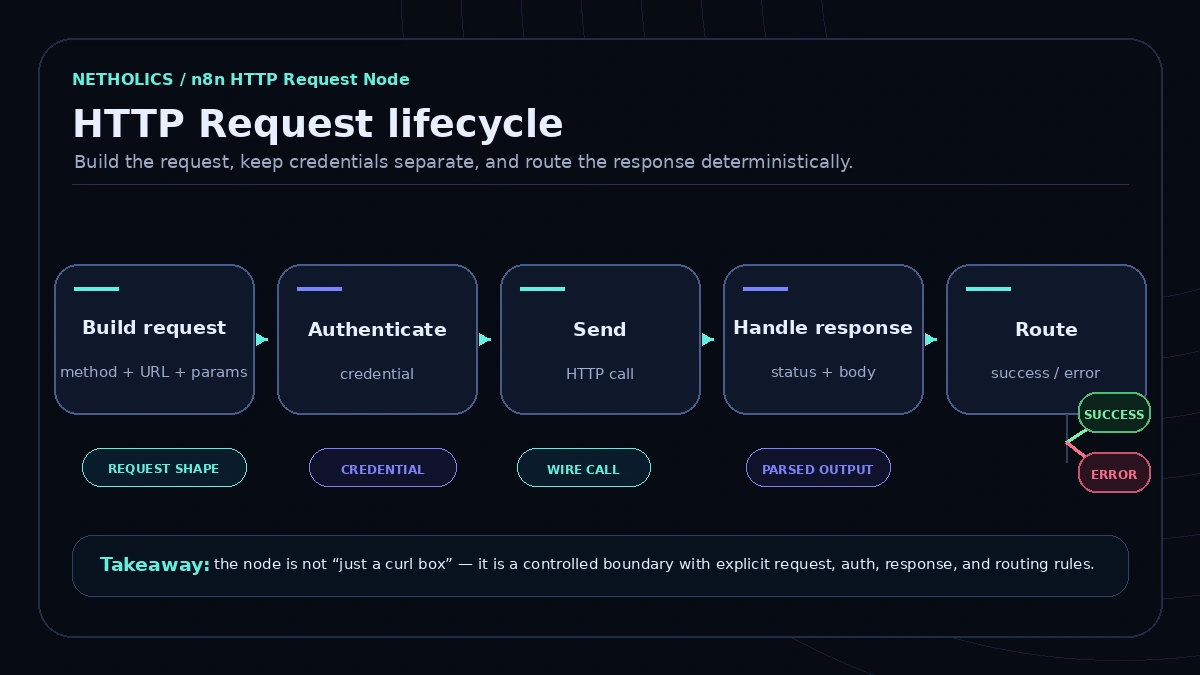
Every well-built HTTP Request step moves through the same five stages. Designing each on purpose, not just the happy path, is what separates a demo call from a workflow that runs unattended.
Stages one to three are what every tutorial covers; the value is in the last two. “Handle response” means reading the status code and parsing the body in the format the API returned. “Route success or error” means a non-2xx result goes somewhere deliberate, a retry, an error branch, or a clean failure, instead of flowing downstream as if it had succeeded.
Authentication: predefined credentials vs generic auth
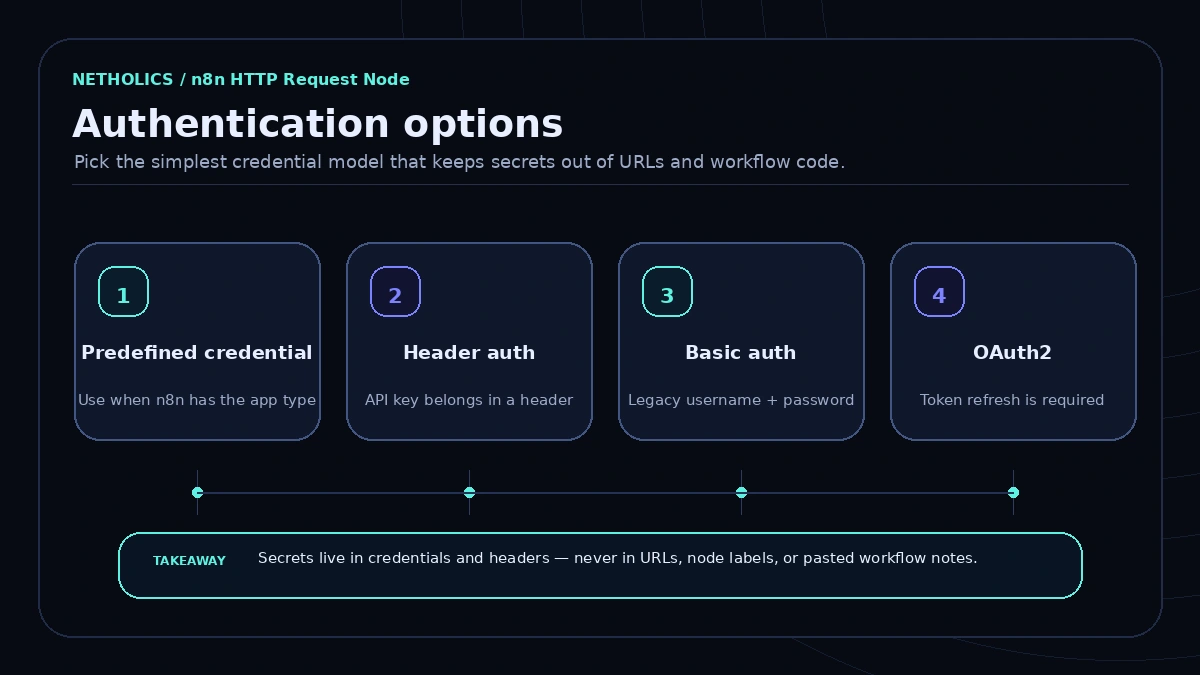
Authentication is where most security mistakes happen, and n8n’s design steers you away from the worst if you let it. The cardinal rule: secrets live in a credential, never in the URL or a plain header field. A token in the URL ends up in execution logs, browser history, and any error message that echoes the request, and as MDN notes, embedding credentials directly in a URL is no longer allowed in modern browsers. Store it once as a credential and reference it; n8n encrypts credentials at rest and keeps them out of the visible workflow.
You have two routes. Predefined credential type lets the node borrow the credential of an existing n8n integration, so you authenticate to, say, a Google or Notion API using the same OAuth credential the app node would, while still calling raw endpoints. Prefer this when it exists; it is the least error-prone path. Generic credentials cover everything else and come in several schemes, mapped below; the full list, including digest and query auth, is in the n8n credentials docs.
| Auth option | Use when | Watch-out |
|---|---|---|
| Predefined credential type | n8n already integrates the service and you just need extra endpoints. | Scopes are tied to that integration; a raw endpoint may need a scope it lacks. |
| Header auth | The API wants a token in a custom header such as Authorization: Bearer … or X-API-Key. | Get the header name and prefix exactly right; wrong casing or a missing space fails silently as 401. |
| Basic auth | The API uses a username and password pair (RFC 7617). | Base64 is encoding, not encryption. Use over HTTPS only, or credentials travel in the clear. |
| OAuth2 | The API issues short-lived tokens via authorization code, client credentials, or PKCE. | Match the grant type; n8n refreshes tokens, but the callback URL and scopes must be registered correctly. |
For anything beyond a single workflow, treat credential hygiene as its own discipline: separate dev and production credentials, rotate tokens, and grant the narrowest scope that works. Our guide to n8n credentials and secrets management covers rotation, environments, and self-hosted secret stores. If instead you are exposing your own endpoint for n8n to call, the same care applies to webhook security and authentication.
Building dynamic requests with expressions
Static requests are rare. Usually the URL, a query value, or a body field must come from earlier data, the contact ID from a trigger, a search term from a lookup, a date computed at runtime. n8n expressions, written in double curly braces, let any field of the request reference incoming data.
Reference the current item with {{ $json.fieldName }} and a named earlier node with {{ $('Node Name').item.json.field }}. Expressions work in the URL, query parameters, headers, and the body, so you can interpolate an ID into a path like https://api.example.com/v1/contacts/{{ $json.contactId }} or set a since query parameter to a computed timestamp. Keep transformation light here; when you need to reshape a payload before or after sending, do it in a dedicated step. Our walkthrough of the n8n data transformation with the Code node shows when to move that logic into real code.
One caution: an expression that resolves to undefined or an empty string usually does not error, it just sends a malformed request. If a dynamic call behaves strangely, pin the node, inspect resolved values in the expression editor, and confirm the upstream field name is exactly what you typed, case included.
Pagination: collecting every page, not just the first
Most list endpoints return one page at a time. Call them once and move on, and you silently process only the first page, under-counting forever. The node has built-in pagination so you do not hand-build a loop for the common patterns.
Enable pagination in the node options and pick the mode that matches the API. The two you meet most often are “Update a Parameter in Each Request”, where the node increments a page number or offset on each call, and “Response Contains Next URL”, where each response includes a next-page link the node follows automatically. Inside the settings you can reference helpers such as $pageCount and the previous $response to compute the next request and decide when to stop, by a maximum page count or a last-page condition (an empty results array or a missing next link).
Two failure modes to design against. Set a sane maximum-request limit so a misconfigured stop condition cannot loop forever and exhaust the quota. And remember that paginated pulls are exactly where you brush against rate limits, since you fire many requests in quick succession. Pair pagination with the retry and back-off tactics in our guide to n8n API rate-limit handling so a large pull degrades gracefully instead of getting throttled.
Handling responses: JSON, binary, and status codes
What comes back is as configurable as what you send. The node’s Response settings control how n8n interprets the reply, and getting this wrong produces confusing downstream errors that look like data problems but are really parsing problems.
Set the response format to match the payload. JSON is the default and parses the body into a usable object. Text returns the raw string. File returns the body as a binary item, which is how you download a PDF, image, or CSV for a later node to handle or re-upload. Choosing JSON for an endpoint that returns a binary file, or file for JSON, is a frequent mismatch.
You can also include the full response, not just the body, so you receive the status code, the headers, and the body together. Turn this on for any non-trivial integration: the status code tells you whether the call truly succeeded, and headers often carry the rate-limit budget and pagination cursor for the next request. By default the node treats a non-2xx status as a failure, which is usually what you want; you can opt to never error on a bad status and inspect the code yourself when an API uses, say, a 404 as a meaningful “not found” rather than a fault.
Error handling, retries, and rate limits
APIs fail: networks blip, servers return 500s, and rate limiters return 429 when you push too fast. A request node that assumes success is a workflow that breaks at 3am. Classify failures and respond to each class deliberately.
- Transient 5xx and timeouts. These usually clear on their own. Enable retry-on-fail with a few attempts and a wait between them so a blip self-heals before it pages a human. Lean on idempotent methods where you can.
- 429 Too Many Requests. The server is telling you to slow down. The node’s built-in retry uses a fixed wait between tries, so true exponential back-off and honouring the
Retry-Afterheader need custom logic (a Wait node plus a loop). Throttling up front beats absorbing 429s after the fact. - 4xx client errors (400, 401, 403, 404, 422). These are your problem, not the server’s, and retrying rarely helps. Route them to an error branch that logs the response body (the API usually explains what was wrong) and records the item for review.
n8n gives you two layers. On the node, “retry on fail” and “continue on fail” (or the error-output branch) keep one bad item from killing a batch. At the workflow level, an attached error workflow catches anything that escapes and guarantees nothing fails silently. Our breakdown of n8n error workflow design patterns shows how to wire the two together so retryable faults self-heal and genuine failures surface loudly.
A reference configuration
Below is the shape of a production-minded HTTP Request node, expressed as parameters: a credential for auth (no token in the URL), an expression-driven JSON body, the include-full-response option, retry on fail, and batching. Replace the names before using it.
# HTTP Request node — enrich a contact (illustrative parameters)
method: POST
url: "https://api.example.com/v1/enrich"
authentication: predefinedCredentialType   # or genericCredentialType: httpHeaderAuth
sendHeaders: true
headers:
  Accept: "application/json"
  # NOTE: no Authorization header here — the credential injects it
sendBody: true
contentType: json                # matches what the API expects
body:
  email: "={{ $json.email }}"    # expression pulls from the previous node
  domain: "={{ $json.company.domain }}"
options:
  response:
    fullResponse: true           # get status code + headers, not just body
    responseFormat: json
  pagination:
    paginationMode: "off"        # single record lookup, no paging
  retry:
    retryOnFail: true
    maxTries: 3
    waitBetweenTries: 2000       # ms; fixed wait - not exponential, does not read Retry-After
  batching:
    batchSize: 5                 # cap concurrent calls to respect rate limits
    batchInterval: 1000          # ms between batches
The exact field names depend on your n8n version, and the node UI is the authoritative place to set these. The point is the posture: credential-based auth, an expression-driven body, full responses so you can read status codes, and retry plus batching so the call holds up under load.
Build runbook
This is the order that gets a new integration working with the fewest surprises. Each step de-risks the next.
- Read the API reference first. Note the exact endpoint, method, required headers, body content type, auth scheme, success status code, and how the API paginates. Five minutes here saves an hour of guessing.
- Create the credential. Set up auth as a predefined or generic credential before building the request, so no secret touches the URL. Use a sandbox token if one exists.
- Build a single static call. Hard-code one known-good value, send it, and confirm a 2xx with the body you expected. Prove the basic call works before adding any dynamism.
- Make it dynamic. Replace hard-coded values with expressions referencing the previous node, and confirm each resolves correctly in the expression editor.
- Set response handling. Choose JSON, text, or file to match the payload, and turn on full response to read the status code and headers downstream.
- Add pagination if it is a list. Pick the matching mode, set a maximum-request ceiling, and verify you collect more than the first page on real data.
- Add error handling. Enable retry on fail, route 4xx to an error branch, and attach a workflow-level error handler so nothing fails silently.
- Load-test the path. Run realistic volume with batching on, watch for 429s, and tune batch size and wait time until it stays inside the limits.
Worked example: enrich a new contact and store the result
Here is the runbook applied to a common job: a new contact lands in your CRM, you enrich it with company data from an external API that n8n has no node for, then write the enriched fields back.
The flow. A trigger fires on a new contact carrying an email. An HTTP Request node calls the enrichment API. A transform step picks the fields you want. A final node writes them back.
- Trigger. The CRM trigger (or a webhook) emits an item with
emailand the contact’s record ID. - Enrich (HTTP Request). POST to the enrichment endpoint, auth via a header-auth credential, JSON body
{ "email": "={{ $json.email }}" }, response format JSON with full response on. A known-good email returns a 200 with company name, size, industry, and domain. - Guard the result. Check the status code. A 200 continues; a 404 (no match) routes to a branch that skips enrichment rather than failing; a 429 retries with back-off.
- Transform. A Code or Set node maps the API’s fields to your CRM’s field names, dropping the rest, so the write-back payload is clean.
- Store. PATCH the contact at
/contacts/{{ $('Trigger').item.json.id }}with only the enriched fields, since you are updating part of an existing record, not replacing it.
What makes this production-grade rather than a demo is the guard step. The naive version assumes a hit and writes garbage (or crashes) the first time a contact has no match or the API throttles you. The version above treats the 404 as a normal outcome, the 429 as a retry, and only writes when it genuinely has data. Scaled to a batch, add batching to the enrich node so a bulk import does not trip the rate limit on the first hundred records.
Common pitfalls
Nearly every broken HTTP Request node falls into one of these.
- Secrets in the URL. A token in the query string leaks into logs and history. Move it into a credential.
- Ignoring non-2xx responses. A failed call that flows downstream as success corrupts data quietly. Read the status code and route failures.
- Wrong content type. JSON when the API wants form-urlencoded (or vice versa) returns 400/415. Match the body type to the reference.
- Not paginating. Calling a list endpoint once processes only page one. Enable pagination and verify on real data.
- Blind retries on non-idempotent calls. Retrying a POST create without an idempotency key makes duplicates. Guard creates; retry GET/PUT/DELETE freely.
- No rate-limit budget. Firing as fast as n8n can send invites 429s. Batch, throttle, and honour
Retry-After. - Unresolved expressions. An expression that resolves to empty sends a malformed request without erroring. Inspect resolved values first.
What other experts say
Reference card · MDN Web Docs
MDN defines an HTTP method as idempotent when an identical request can be sent once or many times with the same effect on server state, and documents GET, PUT, and DELETE as idempotent while POST is not.
Netholics comment: this is the rule that decides whether retry-on-fail is safe in your HTTP Request node. Let n8n retry GET, PUT, and DELETE freely after a timeout, but guard POST creates with an idempotency key or an exists-check first, or a single network blip quietly doubles your records.
Ship an HTTP Request node the right way
- Confirm the contract first. Pull the endpoint path, method, required headers, body content type, auth scheme, and success status from the vendor’s API reference before you build anything.
- Make a credential, not a URL secret. Create a predefined or generic credential for auth so no token ever lands in the URL, a node label, or a plain header field.
- Prove one static call. Hard-code a known-good value and confirm a 2xx with the body you expected before adding any expressions.
- Turn on full response. Enable include-full-response so the status code and headers reach downstream nodes, not just the body.
- Match the response format. Set JSON, Text, or File to fit what the endpoint actually returns, so a binary download is not parsed as JSON.
- Paginate every list. Enable the matching pagination mode and set a maximum-request ceiling so a misconfigured stop condition cannot loop forever.
- Route failures on purpose. Enable retry-on-fail for transient 5xx and 429, and send 4xx client errors to an error branch that logs the response body.
- Cap concurrency. Set batch size and interval so a bulk run stays inside the API’s rate limit instead of tripping 429s on the first hundred items.
HTTP Request readiness card
| Impact | High. One node reaches any REST API n8n ships no dedicated integration for, which unblocks the long tail of internal and niche services. |
| Risk | Medium. Wrong content type, an unresolved expression, missing pagination, or blind POST retries fail quietly and corrupt data rather than erroring loudly. |
| Effort | Low to medium per endpoint once the credential exists and the API reference is open; most time goes into error and pagination handling, not the send. |
| Best first workflow | A single GET read or a contact enrichment against a sandbox token, with full response on and a guard step on the status code. |
| Do not automate yet | Blind-retried POST creates with no idempotency key, or any high-volume pull before you have batching and a rate-limit budget in place. |
Frequently Asked Questions
Q: When should I use the HTTP Request node instead of a dedicated app node?
Use a dedicated app node whenever one exists and covers your operation, because it pre-fills endpoints, handles auth, and shapes the output. Reach for the HTTP Request node when no app node exists, when one is missing an endpoint you need, when you need a header, parameter, or body shape it does not expose, or for an internal or niche API. Most builds use both.
Q: How do I authenticate the HTTP Request node without putting the token in the URL?
Store the secret as an n8n credential and reference it, never as plain text in the URL or a header field. Use a predefined credential type when n8n already integrates the service, or header auth, basic auth, or OAuth2 otherwise. n8n encrypts credentials at rest and injects them at request time, keeping them out of logs and the visible workflow.
Q: Which HTTP method should I choose, and which are safe to retry?
Use GET to read, POST to create, PUT to fully replace, PATCH to partially update, and DELETE to remove. GET, PUT, and DELETE are idempotent and safe to retry after a timeout. POST is not, so retrying can create duplicates unless you use an idempotency key. PATCH is not guaranteed idempotent either, so treat it as unsafe to retry unless the endpoint’s docs say otherwise.
Q: How does pagination work in the HTTP Request node?
Enable pagination in the node options and pick the matching mode. “Update a Parameter in Each Request” increments a page number or offset; “Response Contains Next URL” follows the next-page link the response provides. Use helpers like $pageCount and the previous $response to set a stop condition, and always set a maximum-request ceiling so a misconfigured condition cannot loop forever.
Q: How do I handle errors and rate limits on an HTTP request?
Classify failures. Retry transient 5xx and timeouts with retry-on-fail. For 429 Too Many Requests, retry with back-off and honour the Retry-After header. Route 4xx client errors such as 400, 401, 403, and 404 to an error branch instead of retrying, since they are configuration problems. Pair node-level retry with a workflow-level error handler so faults self-heal and genuine failures surface.
Q: Why does my request fail with a 400 or 415 even though the data looks correct?
The usual cause is a body content-type mismatch: sending JSON when the API expects form-urlencoded, or the reverse. A 400 means the request was malformed; a 415 means the media type is unsupported. Check the reference for the exact content type the endpoint wants, set the node’s body type to match, and confirm any expressions resolve to real values rather than empty strings.
Q: How do I send data from a previous node into the request?
Use n8n expressions in double curly braces. Reference the current item with {{ $json.fieldName }} and a named earlier node with {{ $(‘Node Name’).item.json.field }}. Expressions work in the URL, query parameters, headers, and body. Confirm each resolves to the value you expect in the expression editor, because an unresolved expression sends a malformed request without raising an error.
Q: How do I download a file or read the status code from a response?
Set the response format to File to receive the body as a binary item for download or re-upload, Text for raw strings, or JSON to parse an object. Turn on the include-full-response option to receive the status code and response headers alongside the body, which lets you confirm a call truly succeeded and read rate-limit or pagination headers.
Verified Sources
Integrate any API with Netholics
If you are wiring n8n into APIs that have no off-the-shelf node, we build the HTTP Request layer the right way: credential-based auth, pagination, retries, and error routing that hold up in production. Start with an audit of what you want to connect.