SEO Monitoring Automation with n8n: Build Alerts for Indexing, Traffic Drops, and Technical Errors
A practical n8n workflow for monitoring SEO health signals, routing alerts, and catching indexation or traffic issues before they become invisible revenue leaks.
The 60-second answer
- Start with the operating risk. A practical n8n workflow for monitoring SEO health signals, routing alerts, and catching indexation or traffic issues before they become invisible revenue leaks.
- Build from source truth. Use approved URLs, stable docs, owner names, tests, and clear rollback paths before automation touches production.
- Keep humans where judgment matters. n8n and LLMs should reduce repetitive work while surfacing decisions that affect revenue, customers, or search visibility.
SEO monitoring should be an operating system, not a monthly surprise
Many SEO problems are not strategic mysteries. They are late notifications. A sitemap changes, a page goes noindex, a template breaks source links, impressions fall for a converting query, or a technical error sits unnoticed for two weeks. By the time a monthly report catches it, the opportunity cost is already real.
n8n is a strong fit for lightweight SEO monitoring because it can poll APIs, compare values, enrich alerts, and route issues to the right place without turning the team into dashboard babysitters.
Monitor signals that trigger decisions
Do not monitor everything. Monitor signals that change behavior: submitted URLs dropping out of sitemap visibility, clicks or impressions falling beyond a threshold, key pages returning non-200 status, robots meta changing, structured data disappearing, or priority internal-link targets losing support.
The point is not to create noise. The point is to route a small number of useful alerts with enough context that someone can act immediately.
Use Search Console as the durable base layer
Search Console data is delayed and imperfect, but it is the official source for search performance and indexing signals. A practical workflow pulls page/query data, compares it with the previous window, flags anomalies, and stores the result in a table. For new content, it can also track whether the page starts receiving impressions after publish.
This workflow should complement AI answer monitoring, not replace it. Traditional SEO monitoring watches Google search behavior and technical health. GEO monitoring watches how AI systems describe the brand and cite sources.
Alerts need owners, severity, and next actions
A useful alert says what changed, why it matters, where to inspect, and who owns the fix. “Traffic down” is weak. “/n8n-automation-agency/ impressions for n8n automation agency down 42% week-over-week; check title/meta, internal links, sitemap status, and competitor SERP” is actionable.
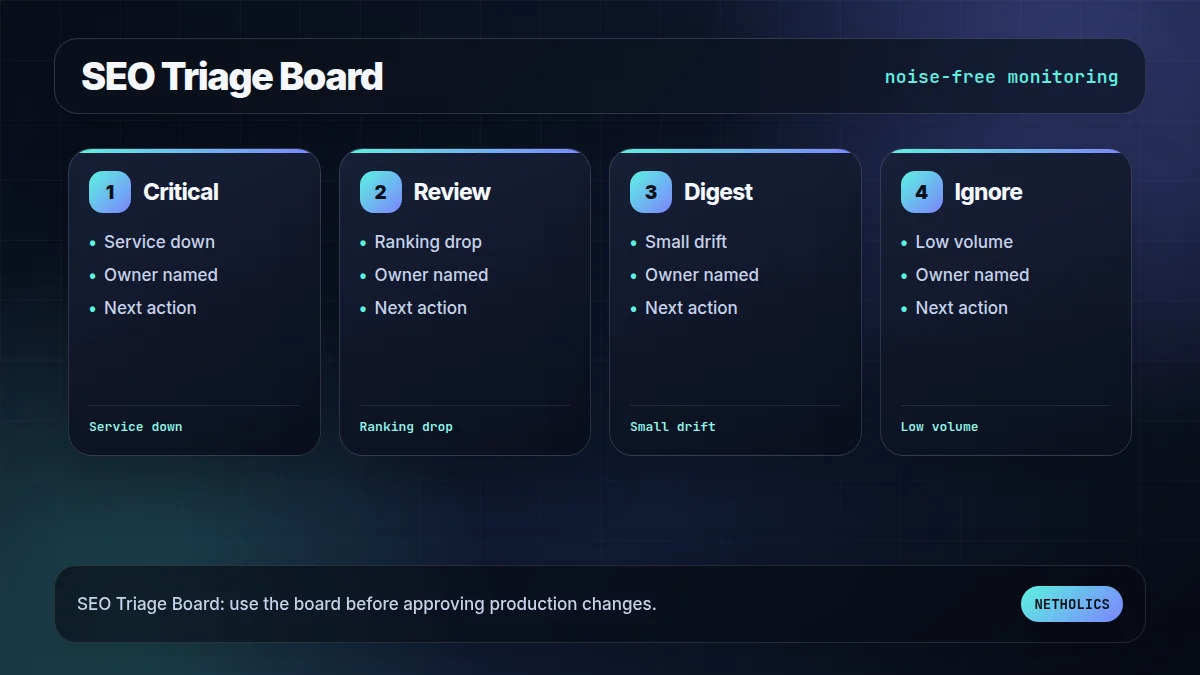
Route alerts by severity. A 500 error on a service page deserves immediate notification. A small impression change can wait for a daily digest.
The hardest part is avoiding alert fatigue
Every monitoring system becomes useless if it cries wolf. Use thresholds, minimum data volume, cooldown windows, and grouped digests. Track alert outcomes so the workflow learns which alerts were useful and which should be suppressed.
Good SEO automation makes the team calmer. It reduces surprise, shortens diagnosis, and gives content/technical owners a shared operating rhythm.
The practical framework
| Signal | Trigger | Action |
|---|---|---|
| HTTP status | Priority URL != 200 | Alert owner and log incident. |
| Robots meta | Indexable page becomes noindex | Verify intent before requesting recrawl. |
| GSC clicks | Drop beyond threshold | Compare query/page and annotate content changes. |
| Sitemap presence | Expected URL missing | Check publish status, canonical, and sitemap cache. |
| Schema block | Article/FAQ missing | Restore schema or template output. |
The workflow map to use first
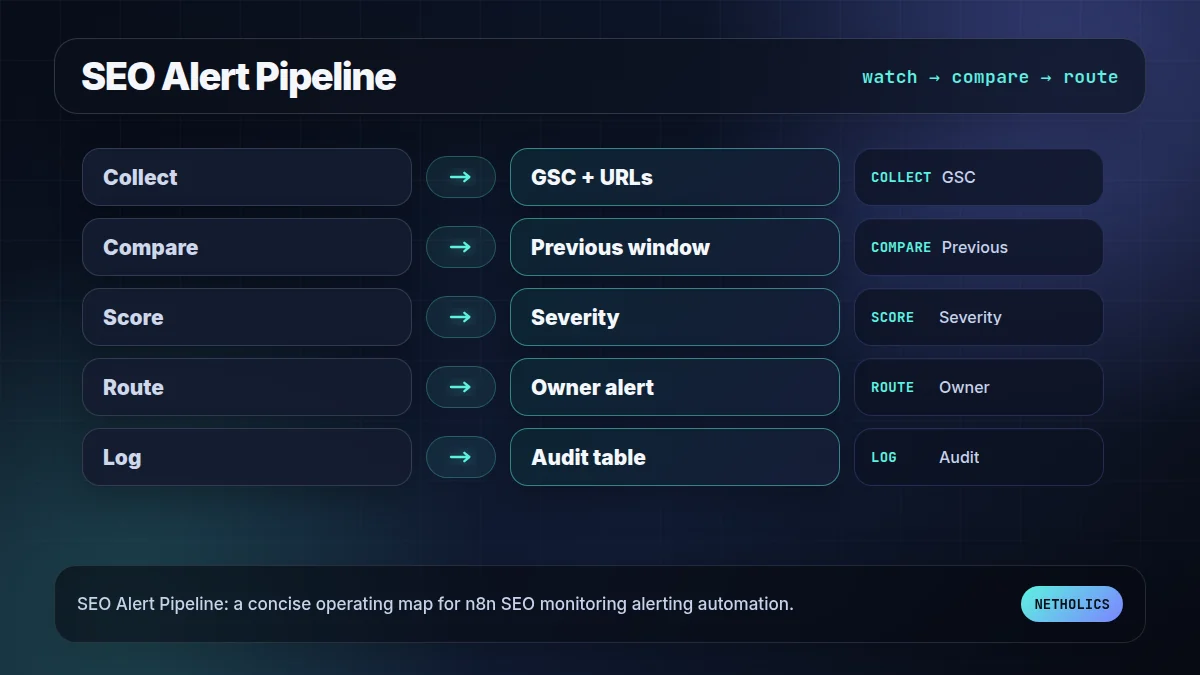
This visual is the fast reader check: if the team cannot name each stage, owner, and failure path, the workflow is not ready for production.
The readiness board before rollout
The second visual turns the idea into an approval board. It keeps the article practical: what has to be true before the workflow should go live?
What the official docs imply
Reference card · durable source
Google Search Console API overview is the stable reference for the underlying implementation model. Use official docs to verify behavior before building client-facing automation.
Netholics comment: The practical opportunity is not copying documentation into a blog post. It is turning those docs into an operating workflow with owners, tests, links, and approval gates. This post connects naturally to SEO content automation AI systems audit generative engine optimization AI answer monitoring workflow n8n HTTP Request node.
Implementation checklist
- Define the business owner. Name the person who can approve exceptions and rollback choices.
- Lock the source of truth. Decide which table, API, sitemap, or CRM record the workflow trusts.
- Capture examples. Keep at least one success case, one empty case, and one failure case.
- Design the failure path. Alerts, logs, and retries must exist before launch.
- Add contextual internal links. Connect this workflow to relevant service pages and sibling posts so readers and crawlers understand the cluster.
- Schedule a review loop. Re-check outcomes after publication or deployment instead of assuming the first version is final.
Automation readiness card
| Decision | Recommendation | Why it matters |
|---|---|---|
| Impact | High | The workflow improves search visibility, operational reliability, or automation ownership. |
| Risk | Medium | Bad automation can create wrong links, missed alerts, or silent workflow failures. |
| Effort | Low to medium | n8n makes orchestration fast, but review rules and tests still need careful setup. |
| Do first | Pilot one workflow | A reversible pilot proves the pattern without risking the whole system. |
Frequently asked questions
Q: Is Search Console data real time?
No. Search Console data has delays, so the workflow should use it for trend and indexation monitoring, not minute-by-minute incident detection.
Q: What should trigger an SEO alert?
Only changes that deserve action: status errors, robots changes, missing sitemap URLs, structured data loss, or significant page/query performance shifts.
Q: How is this different from AI answer monitoring?
SEO monitoring tracks search performance and technical health. AI answer monitoring tracks how LLMs and AI search systems describe and cite the brand.
Q: Where should alerts go?
Route urgent technical alerts to operations channels and lower-risk content changes into a daily or weekly digest.
Q: Can n8n fix SEO issues automatically?
Some fixes can be automated, but diagnosis and approval should remain human-led for titles, canonical changes, noindex decisions, and content updates.
Verified sources
Need this built into a real system?
Netholics designs AI, n8n, SEO/GEO, and growth-system automations with the audit trail, internal links, and review gates needed for production.