Make Scenario Patterns to n8n: Router, Iterator, Data Store, and Error Handler Migration Guide
A practical pattern-by-pattern guide for moving real Make scenarios into n8n without copying brittle automation debt.
The 60-second answer
- Start with the operating risk. A practical pattern-by-pattern guide for moving real Make scenarios into n8n without copying brittle automation debt.
- Build from source truth. Use approved URLs, stable docs, owner names, tests, and clear rollback paths before automation touches production.
- Keep humans where judgment matters. n8n and LLMs should reduce repetitive work while surfacing decisions that affect revenue, customers, or search visibility.
Why a pattern map beats a node-by-node rebuild
A Make scenario is not just a canvas. It contains assumptions about branch order, bundle shape, retries, schedules, credentials, and the person who knows why a filter exists. When teams copy modules one for one, they usually preserve the most fragile part of the old system: undocumented behavior. A pattern map starts with the job the scenario performs, then chooses the n8n structure that makes that job easier to observe and recover.
The migration checklist already tells you how to freeze, mirror, and cut over safely. This guide goes one layer deeper: it maps common Make patterns to the n8n equivalents that should replace them. Use both together when a workflow touches leads, orders, billing, support tickets, inventory, or reporting.
Router and filter patterns become explicit branch logic
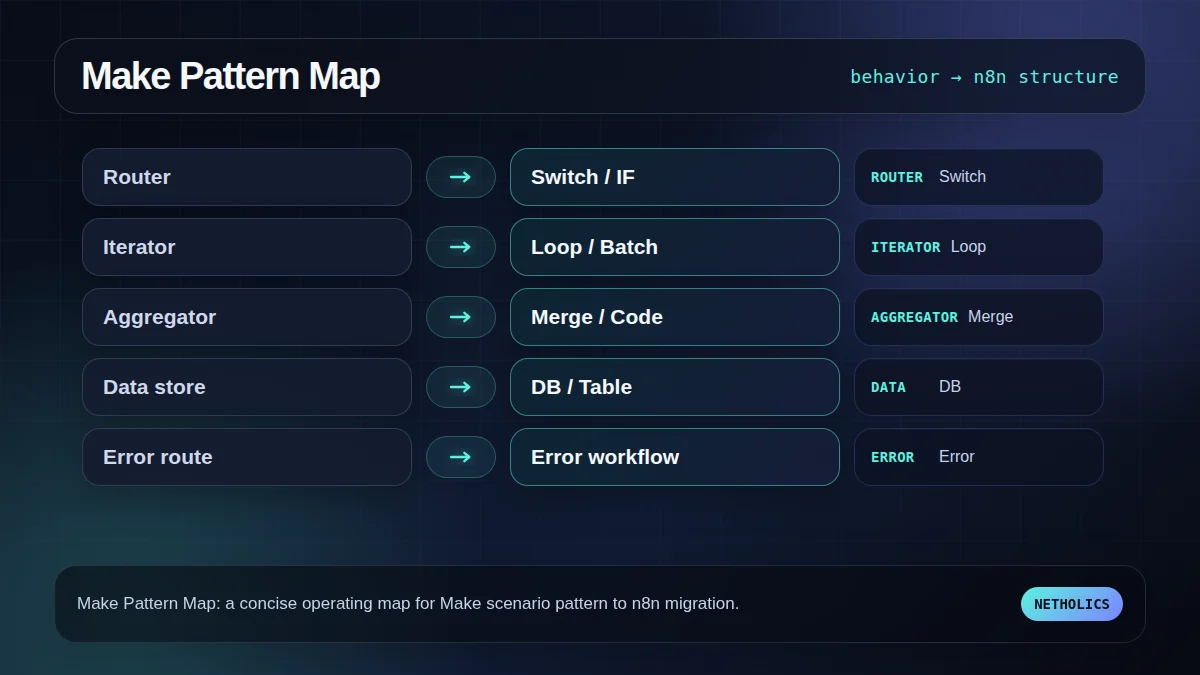
Make routers often hide business rules in small filter bubbles. In n8n, that logic should become a deliberate Switch or IF section with branch names that a non-builder can read. The goal is not to recreate the old visual shape. The goal is to make each branch testable with one positive payload and one negative payload.
Before rebuilding, write each branch in plain English: “enterprise lead with budget goes to CRM owner,” “existing customer goes to support workflow,” “missing email stops and alerts ops.” That written rule becomes the acceptance test for the new branch.
Iterators, aggregators, and batches need edge-case tests
Iterator and aggregator migrations fail when the builder only tests the happy path. Empty arrays, one item, duplicate IDs, and a larger batch can all behave differently. In n8n, Split in Batches, Loop Over Items, Merge, and Code nodes are powerful, but they need explicit expectations about item shape.
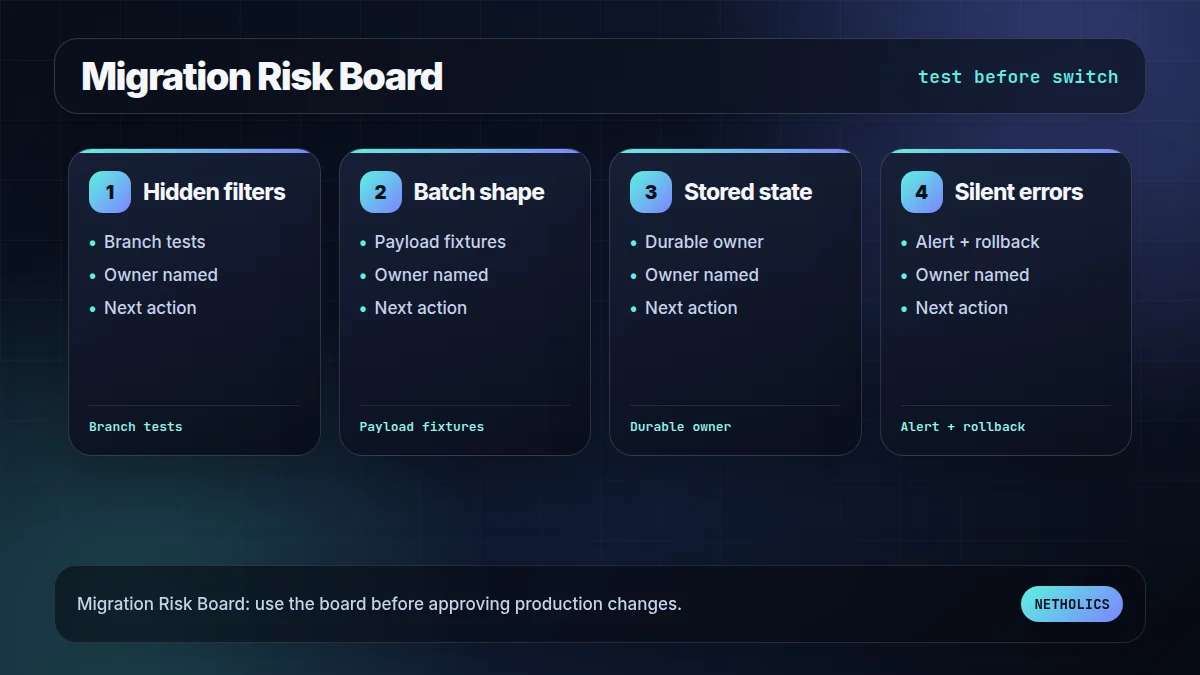
The safe habit is to store three payload fixtures for each transformed data path: empty, ordinary, and overloaded. If a scenario sends invoices, syncs contacts, or creates fulfillment records, test the batch logic before any webhook is switched.
Data stores force an ownership decision
A Make data store can be a clever shortcut or a hidden production database. Migration is the moment to decide which state belongs in n8n static data, which belongs in Airtable or Sheets, and which needs a real database. Copying state blindly is how teams create a second mystery system.
For anything revenue-sensitive, prefer state that is durable, backed up, queryable, and owned by a system the client understands. If the state is only a temporary checkpoint, document the retention rule and failure behavior.
Error handlers become a visible operating model
Make error handlers can be easy to ignore until the first silent failure. In n8n, error workflows, retries, execution logs, and alerts should be designed before cutover. The most important question is not “does the workflow retry?” It is “who knows when the retry failed and what do they do next?”
This is where a migration becomes an operations upgrade. The n8n version should expose failures, route critical exceptions, and keep rollback instructions close to the workflow owner.
The practical framework
| Make pattern | n8n destination | Migration decision |
|---|---|---|
| Router + filters | Switch / IF section | Name every branch and test with positive and negative payloads. |
| Iterator | Loop Over Items / Split in Batches | Test empty, one-item, and high-volume payloads. |
| Aggregator | Merge / Code node | Define item shape before writing transformations. |
| Data store | DB, Airtable, Sheets, or static data | Decide what state must be durable and queryable. |
| Error handler | Error workflow + retries + alerting | Design ownership and rollback before production. |
The workflow map to use first
This visual is the fast reader check: if the team cannot name each stage, owner, and failure path, the workflow is not ready for production.
The readiness board before rollout
The second visual turns the idea into an approval board. It keeps the article practical: what has to be true before the workflow should go live?
What the official docs imply
Reference card · durable source
n8n workflows documentation is the stable reference for the underlying implementation model. Use official docs to verify behavior before building client-facing automation.
Netholics comment: The practical opportunity is not copying documentation into a blog post. It is turning those docs into an operating workflow with owners, tests, links, and approval gates. This post connects naturally to Make to n8n migration checklist n8n error workflow design patterns n8n Code node data transformation n8n automation agency AI systems audit.
Implementation checklist
- Define the business owner. Name the person who can approve exceptions and rollback choices.
- Lock the source of truth. Decide which table, API, sitemap, or CRM record the workflow trusts.
- Capture examples. Keep at least one success case, one empty case, and one failure case.
- Design the failure path. Alerts, logs, and retries must exist before launch.
- Add contextual internal links. Connect this workflow to relevant service pages and sibling posts so readers and crawlers understand the cluster.
- Schedule a review loop. Re-check outcomes after publication or deployment instead of assuming the first version is final.
Automation readiness card
| Decision | Recommendation | Why it matters |
|---|---|---|
| Impact | High | The workflow improves search visibility, operational reliability, or automation ownership. |
| Risk | Medium | Bad automation can create wrong links, missed alerts, or silent workflow failures. |
| Effort | Low to medium | n8n makes orchestration fast, but review rules and tests still need careful setup. |
| Do first | Pilot one workflow | A reversible pilot proves the pattern without risking the whole system. |
Frequently asked questions
Q: Can Make scenarios be imported into n8n automatically?
Not as a clean production migration. Treat any import or copy attempt as a reference, then rebuild behavior with explicit tests, branch names, and failure handling.
Q: What is the riskiest Make pattern to migrate?
Error handling and hidden router filters are usually riskiest because failures can stay invisible until revenue workflows break.
Q: Should every Make data store move into n8n?
No. Decide whether the state is temporary, durable, queryable, or business-critical. Some state belongs in a database or external table.
Q: How many workflows should move first?
Start with one representative but reversible workflow. It should include a trigger, branch, data transform, external API call, and alert path.
Q: How does this relate to the migration checklist?
The checklist covers project sequencing. This guide covers the pattern-level architecture inside each rebuilt workflow.
Verified sources
Need this built into a real system?
Netholics designs AI, n8n, SEO/GEO, and growth-system automations with the audit trail, internal links, and review gates needed for production.