AI Image Workflow for WordPress: Generate and Review Safely
Move AI-assisted images from concept to WordPress through deterministic dimensions, useful filenames, honest alt text, visual review, media metadata, and a clean replacement path.
The 60-second answer
- Write the image job and text-safe layout before generating pixels.
- Use deterministic HTML/SVG rendering when labels, diagrams, or exact dimensions matter.
- Keep one approved WebP, descriptive metadata, source artifact, and replacement version per visual.
- Verify the public image response, natural dimensions, mobile rendering, and article context after upload.
Why this needs a controlled workflow
Image automation often optimizes the easiest step: generating a file. Production problems appear later—misspelled labels, unreadable mobile text, duplicate media, vague filenames, decorative alt text, unexpected crops, oversized payloads, and old versions stuck in caches.
A WordPress media workflow starts with the communication job. Is the visual explaining a sequence, helping a buyer decide, showing a result, or adding atmosphere? That decision determines whether the right tool is a deterministic diagram, a screenshot, an edited photograph, or a generative image.
This is where AI Content Automation Agency work differs from generic generation: the workflow owns evidence, state, review, and the next safe action.
The image workflow for WordPress operating model
The system has five bounded stages. Each stage produces an inspectable artifact before the workflow advances.
- Brief the visual. Define purpose, audience, layout, labels, text-safe zones, dimensions, and prohibited elements.
- Choose the render path. Use HTML/SVG for exact text, screenshots for real interfaces, and generation for visual concepts.
- Render and optimize. Produce the canonical dimensions, inspect pixels, convert to WebP, and retain the source artifact.
- Prepare metadata. Use a descriptive filename, human alt text, title, caption, and attachment context without keyword stuffing.
- Upload and verify. Check public MIME type, natural dimensions, responsive display, lazy loading, cache behavior, and article fit.
Controls that keep automation honest
Use the control table to separate evidence and state from generated prose. The goal is not more fields; it is a small record that makes unsafe shortcuts visible.
| Asset type | Best production method | Primary QA risk |
|---|---|---|
| Text-heavy diagram | Deterministic HTML/CSS/SVG render | Overlap, tiny labels, off-center connectors |
| Product/interface proof | Current screenshot with sensitive data removed | Stale UI, privacy leakage, unreadable crop |
| Conceptual illustration | Generative image plus human art direction | Brand drift, implausible details, accidental text |
| Photographic evidence | Owned/licensed photo with light editing | Rights, authenticity, irrelevant decoration |
Four failure modes to design out
A useful workflow can still fail when the sequence is technically valid but operationally unowned. Watch for these four patterns during the pilot.
Input not approved
The automation begins before brief the visual is complete. The system then scales ambiguity: reviewers correct facts, audience, and scope downstream even though those decisions belonged at intake. Make the first-stage artifact a hard requirement, not an optional prompt field.
Volume becomes the KPI
Teams count generated drafts or updated records because output is easy to measure. That rewards activity even when the work is rejected, creates no qualified response, or makes the content estate harder to maintain. Measure accepted work and useful outcomes instead.
Review has no owner
An approval node does not create accountability by itself. Name who can approve, what evidence they must see, which defects return the item, and how long a pending review may wait before escalation. Otherwise the gate becomes a ceremonial click.
No safe rollback
The workflow changes WordPress, media, metadata, or source records without preserving the previous state. A later problem becomes an emergency reconstruction. Store the prior version, workflow input, approval record, and affected URLs before every consequential write.
Measure the system, not just the output
Choose a small metric set before launch. Capture the baseline manually, then compare the automated path against the same definition. This prevents faster production from being mistaken for better operations.
| Metric | Measure | Interpretation |
|---|---|---|
| Input acceptance rate | Share of candidates that arrive with the source, owner, scope, and required fields complete. | Low acceptance means the workflow is compensating for a broken intake process. |
| First-pass approval rate | Share of generated items approved without factual, structural, or brand correction. | Track rejection reasons separately; a single percentage cannot show what to fix. |
| Defect escape rate | Published items later corrected for unsupported claims, broken media, wrong state, links, or metadata. | Count escaped defects even when a customer never reports them. |
| Qualified outcome | Medium to high when diagrams clarify complex services or implementation steps. | Tie the workflow to the reader, search, operational, or commercial job it was built to improve. |
Review these metrics by workflow version and content type. If results are blended together, a high-volume low-risk path can hide failures in a smaller but commercially important path.
A minimal control record
This example is intentionally platform-neutral. Store equivalent fields in a database, spreadsheet, CMS record, or workflow payload so the decision survives beyond one prompt.
media_asset:
  filename: netholics-topic-workflow-2026.webp
  width: 1200
  height: 675
  format: image/webp
  source_artifact: assets/netholics-topic-workflow-2026.html
  alt: Human description of what the visual explains
  caption: Why this image matters in this section
  review:
    mobile_legibility: pass
    text_overlap: pass
    public_mime: pass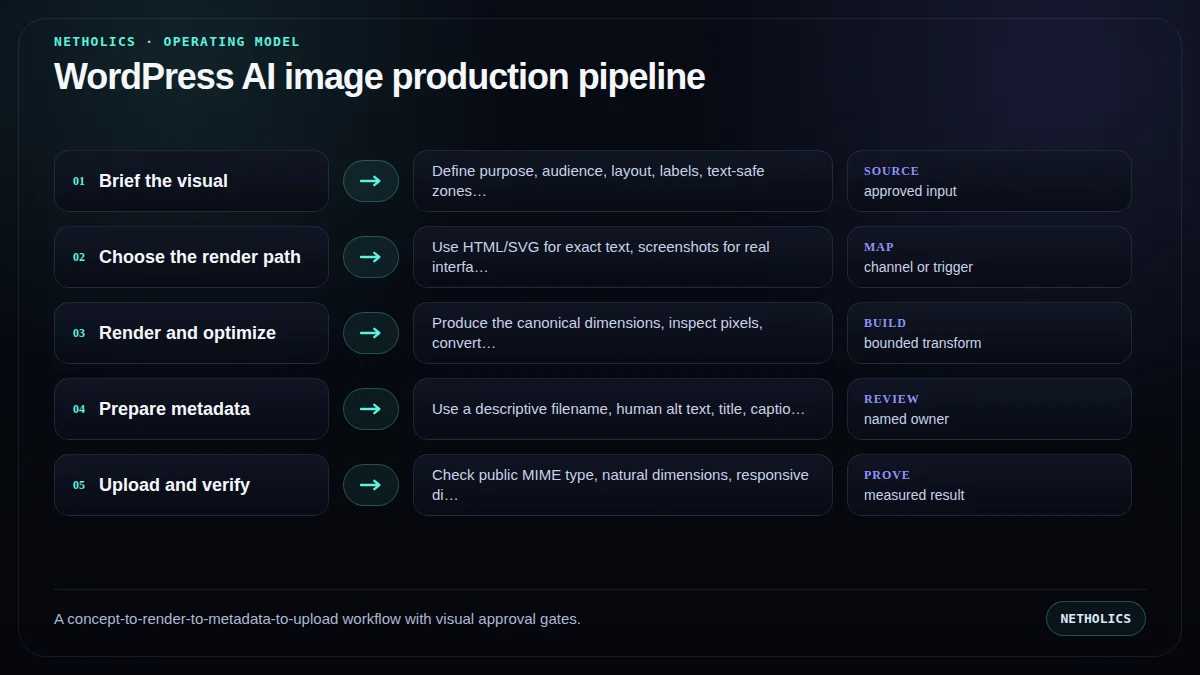
A practical launch runbook
Run the system manually before scheduling it. Automation should make a proven review process repeatable—not hide an undefined one.
- Define the communication job. Write one sentence explaining what the reader should understand after seeing the image.
- Reserve layout zones. Allocate room for heading, diagram, caption, and safe gutters before adding content.
- Render at final geometry. Use the intended 16:9 size instead of scaling an arbitrary canvas later.
- Run pixel review. Inspect labels, alignment, contrast, arrows, crops, and empty space at desktop and messaging-app size.
- Create media metadata. Write the filename, alt text, title, and caption for humans; do not copy the article keyword everywhere.
- Upload once and verify. Keep the approved copy, insert width/height, test the public file, and version the URL only when replacing it.
A staged 30–60–90 rollout
Days 1–30: baseline and shadow mode. Complete the first runbook steps manually, record current review time and defect types, and let the workflow produce recommendations without writing to production. Compare every proposed action with a human decision.
Days 31–60: limited live pilot. Allow one narrow, reversible path to write only after approval. Cap weekly volume, keep the previous version, and review input acceptance, first-pass approval, and escaped defects. Do not widen scope to make a weak metric look better.
Days 61–90: controlled expansion. Add one adjacent use case only when the first path has stable ownership and a qualified outcome. Reuse the state model and logging, but write a fresh risk boundary for the new path.
After day 90: operate, do not merely launch. Assign maintenance, source revalidation, workflow-version review, and rollback testing. The best first workflow remains One flow map and one decision board for a substantial technical article.; expansion is earned by evidence rather than by schedule.
What authoritative sources add
Netholics comment: official guidance is a boundary, not a substitute for implementation judgment. The workflow still needs an accountable owner and a visible reason for every consequential transition.
Implementation checklist
- State the image's communication job before rendering.
- Use exact final dimensions and reserve safe zones.
- Keep in-image text short enough for mobile review.
- Use centered SVG connectors instead of font arrow glyphs.
- Store deterministic source, PNG preview, and final WebP.
- Write descriptive alt text that does not repeat the caption.
- Verify public MIME type, dimensions, lazy loading, and cache-busted replacement.
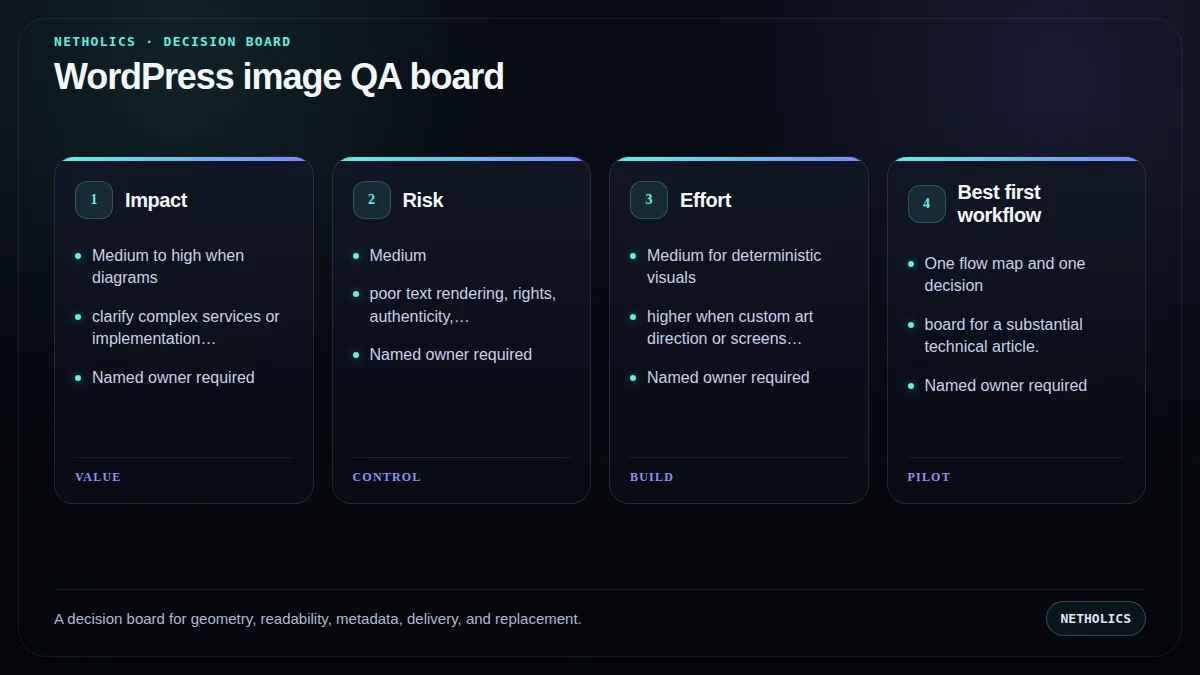
Automation readiness card
| Decision | Score |
|---|---|
| Impact | Medium to high when diagrams clarify complex services or implementation steps. |
| Risk | Medium; poor text rendering, rights, authenticity, and metadata errors can damage trust. |
| Effort | Medium for deterministic visuals; higher when custom art direction or screenshots are required. |
| Best first workflow | One flow map and one decision board for a substantial technical article. |
| Do not automate yet | When rights are unclear, source screenshots contain private data, or nobody can visually approve the output. |
Frequently asked questions
Q: Can WordPress upload WebP images?
Modern WordPress supports WebP when the hosting environment supports the format. The workflow should still verify the public MIME type and rendered dimensions after upload.
Q: Should AI-generated images use special alt text?
Alt text should describe the useful visual content and function. It should not advertise that an image was AI-generated unless that fact is relevant to the reader's understanding.
Q: When should I use HTML or SVG instead of image generation?
Use deterministic rendering for diagrams, scorecards, labels, arrows, and exact brand geometry. Generative tools are better suited to conceptual or photographic-style visuals.
Q: Should blog images become WordPress featured images?
Only when the theme and design intentionally use that treatment. A workflow should not set featured images blindly because many themes render them as large banners.
Q: How should an image be replaced?
Back up the existing file, overwrite or upload the approved replacement, update metadata if needed, bump a cache-busting version, and verify the public file and article rendering.
Q: How many custom images should a technical article use?
Use as many as materially improve understanding. For a substantial Netholics guide, one process visual and one decision visual usually provide complementary value without becoming decoration.
Verified sources and next steps
For related implementation detail, continue with WordPress AI Automation, AI Content Automation Agency, SEO-safe AI content workflow, Structured data automation.
Build the workflow before you scale the output
Netholics maps the source, state, review, WordPress, SEO, and GEO controls before automating production.